Four add-ons. Warming is $0.60 per mailbox per month for each mailbox with warming on. Email-user credits are extra mailboxes beyond your plan's included count at $1 per mailbox per month. Dedicated IPs are $20 per IP per month on Enterprise, set up by the support team. Pre-warmed marketplace addresses are $3 per address per month with no minimum term, billed on their own subscription. Warming, credits, and dedicated IPs bill with your plan and end when you cancel it; pre-warmed addresses do not.
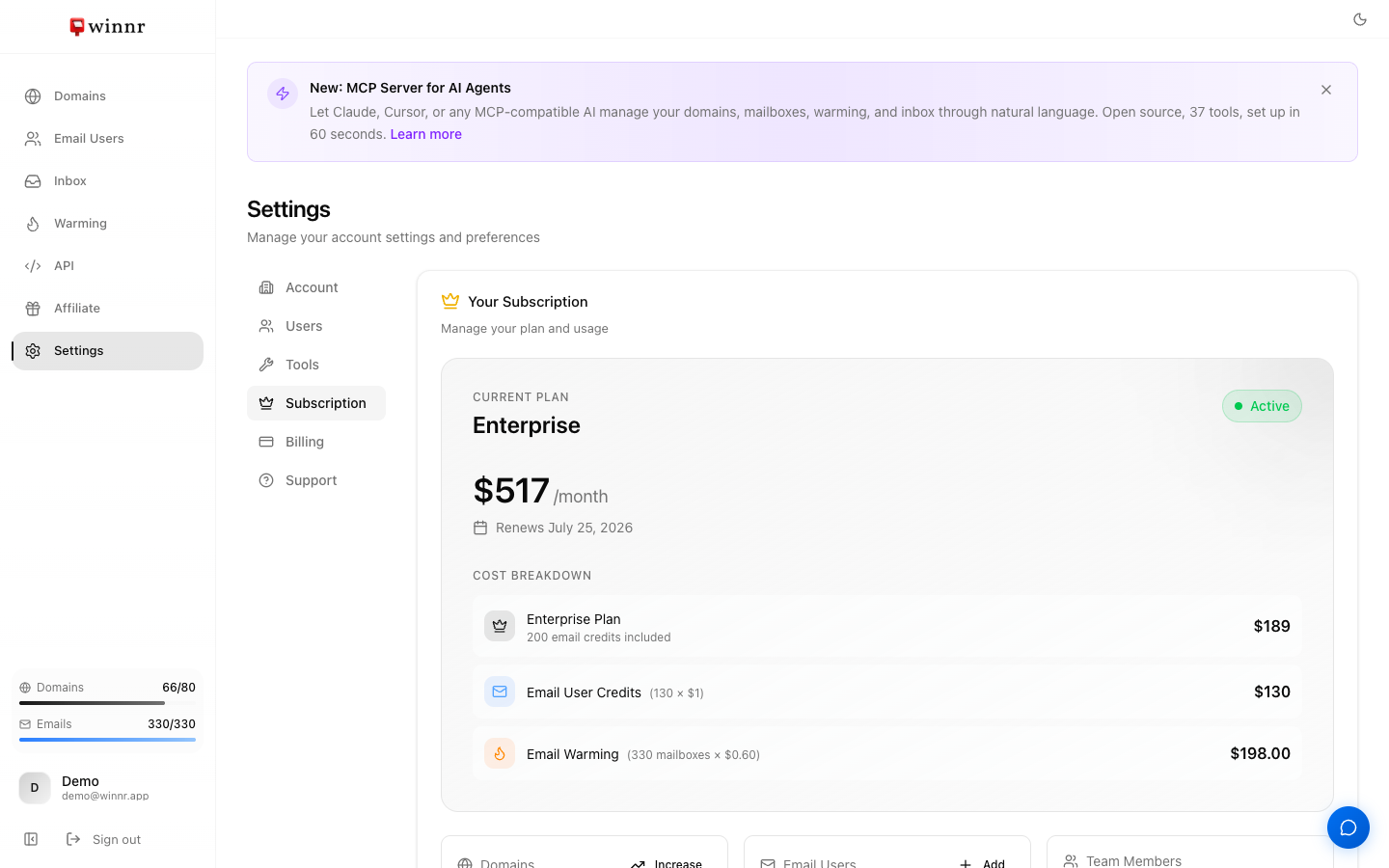
Your current add-ons and their costs are listed under Cost Breakdown in Settings → Subscription.
The four add-ons in detail
Warming: $0.60 per mailbox per month
Billed only for mailboxes with warming enabled. When you enable warming, you pay a full month up front for each newly enabled mailbox, then it renews with your plan. A paused mailbox still counts. A disabled mailbox stops counting from the next cycle, with no refund for the current one.
Turn warming on and off from the Warming page. See Warming billing for the details.
Email-user credits: $1 per mailbox per month
Extra mailbox capacity beyond your plan's included count (50 on Startup, 200 on Enterprise). Credits add on top of the included count.
- Adding them automatically. When a new batch of mailboxes would take you over your limit, the Add Email Users dialog shows the extra cost and adds the credits when you confirm.
- Adding or lowering them yourself. In Settings → Subscription, click Add on the Email Users card. You can't lower credits below the number of mailboxes you have in use, so delete mailboxes first if you want to go lower.
Credit changes are prorated. Startup plus credits is cheaper than Enterprise up to 170 mailboxes.
Dedicated IPs: $20 per IP per month (Enterprise)
A sending IP used only by your account. It isn't a self-serve toggle: email support@winnr.app and the team sets it up and adds it to your subscription. Once active it shows as "Dedicated IP" in your cost breakdown. See Dedicated IPs.
Pre-warmed marketplace: $3 per address per month
Aged, warmed domains and mailboxes, ready to send from day one. They are a separate pool: they don't count against your plan's mailbox or domain limits, and you don't need a base plan to buy them.
- The first month is charged at purchase. After that they renew monthly on their own subscription.
- No minimum term. Cancel any pre-warmed domain from your Domains page at any time.
- Cancelling your plan does not cancel pre-warmed addresses. You keep them at $3 per address per month until you cancel them.
- Warming on a pre-warmed mailbox is optional and billed at the standard $0.60.
- Pre-warmed domains retire when their registration ends unless you switch on Auto-renew pre-warmed domains in Settings → Subscription. See Auto-renew pre-warmed domains.
See Pre-warmed billing terms and Browse the pre-warmed marketplace.
When each add-on makes sense
- Warming: new mailboxes, for at least 2 weeks before cold sending (4 weeks on a brand-new domain).
- Credits: when you need more mailboxes than your plan includes. Up to 170 total mailboxes, Startup plus credits costs less than Enterprise.
- Dedicated IP: high, steady volume, or when you want a reputation that no one else's sending can affect.
- Pre-warmed: when you need to start sending right away and can't wait out a warming period.
What's next
Frequently asked questions
Can I have several add-ons at once?
Yes. They stack independently. For example, warming on 50 mailboxes ($30/mo), 20 pre-warmed addresses ($60/mo), and 2 dedicated IPs ($40/mo) on top of Enterprise ($189/mo).
When are add-ons billed?
Warming, email-user credits, and dedicated IPs renew with your plan on the same monthly invoice. Pre-warmed addresses renew on their own separate monthly subscription, so they get their own invoice.
Is warming prorated?
No. When you turn warming on, Winnr charges a full month ($0.60) for each newly enabled mailbox right away. After that, warming renews with your plan. Turning warming off stops the charge from the next cycle, with no credit for the rest of the current month. Pausing does not stop the charge.
Are email-user credits prorated?
Yes. Adding credits mid-cycle charges only for the rest of the current cycle. Removing credits gives a prorated credit on your account balance, which is applied to your next invoice.
How do I stop an add-on without cancelling my plan?
Warming, turn it off from the Warming page. Email-user credits, lower them from Settings → Subscription (you can't go below the number of mailboxes you use). Pre-warmed, cancel the pre-warmed domain from your Domains page. Dedicated IPs, email support@winnr.app.
Are add-on prices the same on Startup and Enterprise?
Yes. Dedicated IPs are the one exception, since they're offered on Enterprise.