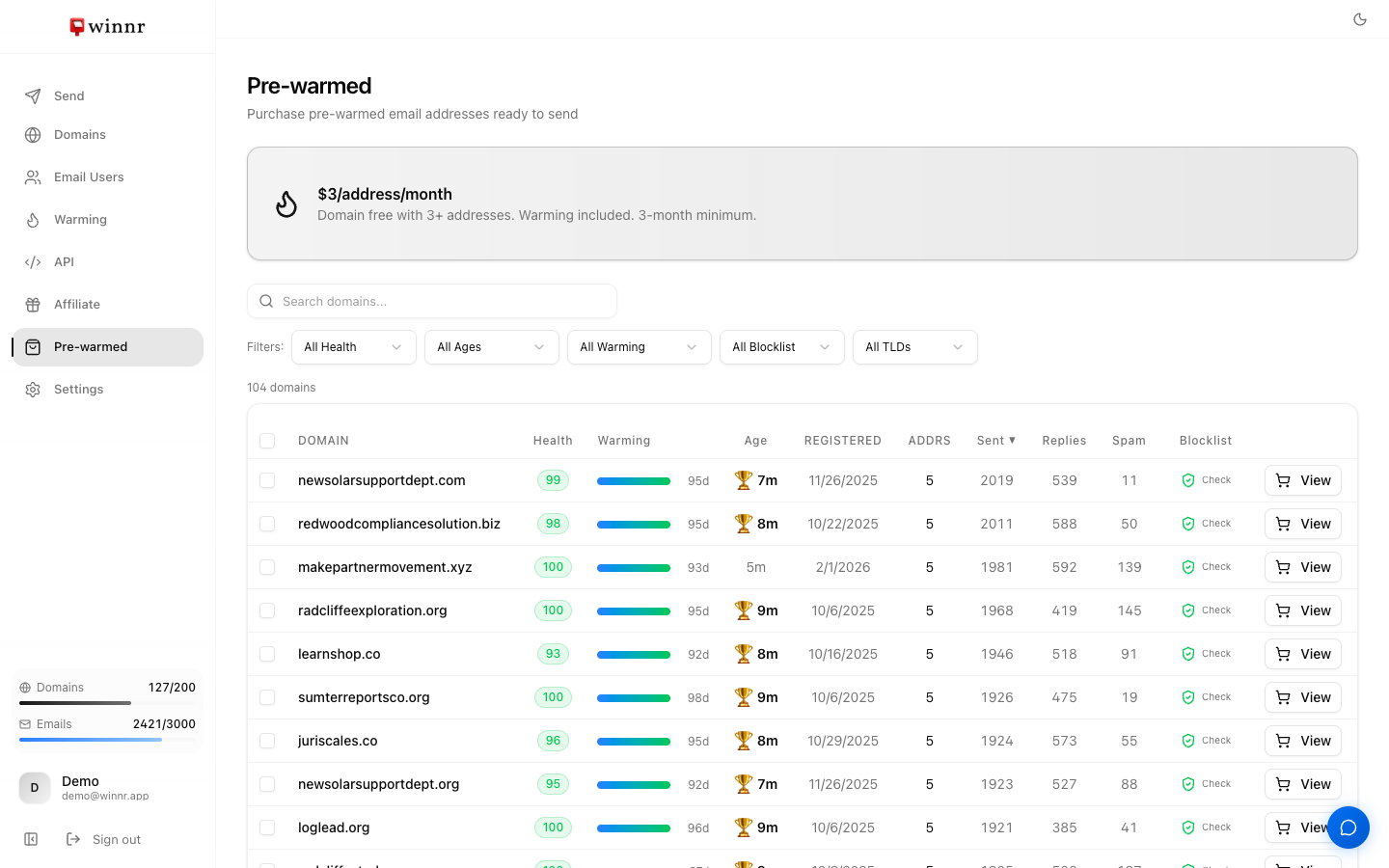
Open Pre-warmed in the app sidebar to see aged domains whose mailboxes Winnr has already warmed. Search by name, filter by health, domain age, warming days, blocklist status and TLD, and sort by any column. Click View on a domain, or tick several and click Purchase, to open the purchase wizard. Pricing is $3 per address per month on its own subscription, with no base plan needed, no separate domain fee and no minimum term.
When pre-warmed is worth it
Buy pre-warmed if: - You need to start sending within days and don't have time to warm. - Your campaigns are high-value and the extra $3/month per mailbox is small next to that. - You want to test cold email quickly, with or without a Winnr plan.
Warm your own domains instead if: - You have 2-3 weeks of lead time. - You're cost-sensitive at scale. Over the long run, warming your own mailboxes costs less. - You want domains that are permanently yours.
Many customers do both: buy a batch of pre-warmed mailboxes to launch now, and warm their own domains in the background to scale up.
What the columns mean
| Column | What it shows |
|---|---|
| Health | Average warming reputation of the domain's mailboxes, 0-100. See Health scores. |
| Warming | Days of warming so far. 30 days counts as fully warmed. |
| Age | Time since the domain was registered. A trophy marks domains 6 months or older. |
| Registered | Registration date. |
| Addrs | Number of warmed addresses available on the domain. |
| Sent, Replies, Spam | Warmup emails sent, replies received, and emails the warming network moved out of spam. |
| Blocklist | Click the shield for a live check against 9 blocklists. See Blocklist checks. |
What you get
For a domain you buy:
- The domain. Aged, with its DNS already set up and managed for you.
- The mailboxes. Either the warmed addresses you chose to keep, with the same passwords they used while warming, or new addresses with names you choose.
- Ready-to-send setup. No warming period. Export credentials and connect your sending tool.
What's not included
- Ongoing warming. Warming stops at handover. You can turn it on for any of the mailboxes afterwards at $0.60/mailbox/month, on top of the $3/month per address.
- Permanent ownership. The domain goes back to Winnr if you cancel, and it is retired at the end of its registration unless you turn on auto-renewal.
What's next
Step-by-step
-
1. Open the Pre-warmed page
In the app sidebar, click Pre-warmed.
-
2. Narrow the list
Search by domain name, or use the filters for Health, Domain Age, Warming, Blocklist and TLD. Click a column header (Domain, Health, Warming, Age, Sent, Replies, Spam) to sort by it.
-
3. Check a domain
Hover the health score, warming bar or age for details. Click the shield in the Blocklist column to run a live check against 9 blocklists.
-
4. Pick one or several
Click View on a row to buy that domain, or tick the checkboxes on several rows and click Purchase N Domains to buy them in one order.
-
5. Complete the purchase wizard
Choose Keep Pre-Warmed Addresses or Create Custom Addresses, pick or name at least 3 addresses per domain, review the monthly total, tick the confirmation and click Purchase. The first month is charged immediately. If you have no card on file, you're asked to add one.
-
6. Start sending
The domain and its mailboxes appear in your Domains and Email Users lists, marked with an amber sparkle icon. Kept addresses are ready right away. Custom addresses take a few minutes to create.
Frequently asked questions
How much does a pre-warmed mailbox cost?
A flat $3 per mailbox per month while you keep it. The domain carries no separate charge. The first month is charged at purchase.
Do I need a Winnr plan?
No. Pre-warmed mailboxes are billed on their own monthly subscription and work with or without a base plan. You only need a card on file.
Are pre-warmed mailboxes really ready to send?
Yes. Each domain is aged and its mailboxes have been warming in inventory before sale, and listings found on a blocklist are removed. Check the Warming column. 30 days of warming counts as fully warmed.
Do pre-warmed mailboxes count against my plan limits?
No. They are a separate pool. They don't use your plan's email user limit or your domain slots.
How many addresses come with a domain?
Most listings have 5 warmed addresses (the Addrs column shows the exact number). You take at least 3 per domain. You can add more later, up to 10 per domain, at $3/month each.
Is warming included after I buy?
No. Warming is already done and stops at handover. If you want it to keep running as reputation maintenance, turn it on for those mailboxes like any other, at the standard $0.60/mailbox/month.
Do I own the domain?
You have full use of it while you keep it, but it stays a Winnr marketplace domain. If you cancel, it returns to Winnr. If you want a domain that's permanently yours, buy one through Domains → Purchase Domain(s).
Can I cancel a pre-warmed purchase?
Yes, at any time. There is no minimum term. See [Cancel a pre-warmed purchase](/help/marketplace/cancel-prewarmed.html).
Why is the Pre-warmed page greyed out or out of stock?
New pre-warmed domains are added regularly. If there's nothing suitable right now, check back later.