Click "Purchase Domain(s)", choose Classic domains, and generate or search for available .com/.co/.org/.net names. Select the domains, click "Setup Email Users" to configure the mailboxes the wizard creates on them (5 per domain by default), then Review and pay. Domains are a one-time charge. Mailboxes are included up to your plan limit, and any beyond it are added as email-user credits at $1/mailbox/month. In a multi-domain order, domains register 7-13 minutes apart and show as Pending until each one starts.
One wizard, two things at once
The most important thing to understand about Purchase Domains: it isn't a domain-only checkout. In one flow it registers the domains and creates mailboxes on them. That's why the steps are Search Domains, Configure Users, Review. The Configure Users step is where you decide how many mailboxes to create (default 5 per domain), and it's what can add a monthly charge on top of the one-time domain cost.
What it costs
- Domains: charged per domain at purchase, shown in the search results before you select anything. No monthly domain fee (see renewal below).
- Mailboxes: free up to your plan's included email-user limit (50 on Startup, 200 on Enterprise). Any beyond that are email-user credits at $1/mailbox/month, charged immediately and shown on the Review step as "+$X/mo".
What Winnr does behind the scenes
After you pay, for each domain in the order:
- Registration. Winnr registers the domain on your behalf (spaced out across a multi-domain order).
- DNS setup. The full record set is created: inbound A, MX (
10 inbound.yourdomain.com), SPF (ending in-all), DKIM atdkim._domainkey, and ap=rejectDMARC policy. - Mailbox creation. The email users you configured are created on the domain.
- Redirect. If you entered a redirect URL, it's set up on the domain.
- Forwarding. If you entered a forwarding address, it's switched on once the mailboxes exist, so a copy of every email they receive also goes to that address.
- Health tracking. The domain is added to the daily DNS health check.
You don't touch DNS or handle registrar credentials. The domain shows up in your Domains list and is yours to use.
Paying for domains
You pay for a domain when you buy it; there's no monthly domain fee. Domains are registered for a year at a time. While your account is active, Winnr renews the domains it registered for you before they expire and emails you 30 and 14 days ahead with the date. To stop a domain from renewing, delete it before the date in that email.
What's next
- Add or adjust mailboxes later: Create a mailbox
- Set a redirect or forwarding address: Domain redirects and forwarding
- Bring a domain you already own: Connect an existing domain
- Pick the right extension: TLD guide for cold email
Step-by-step
-
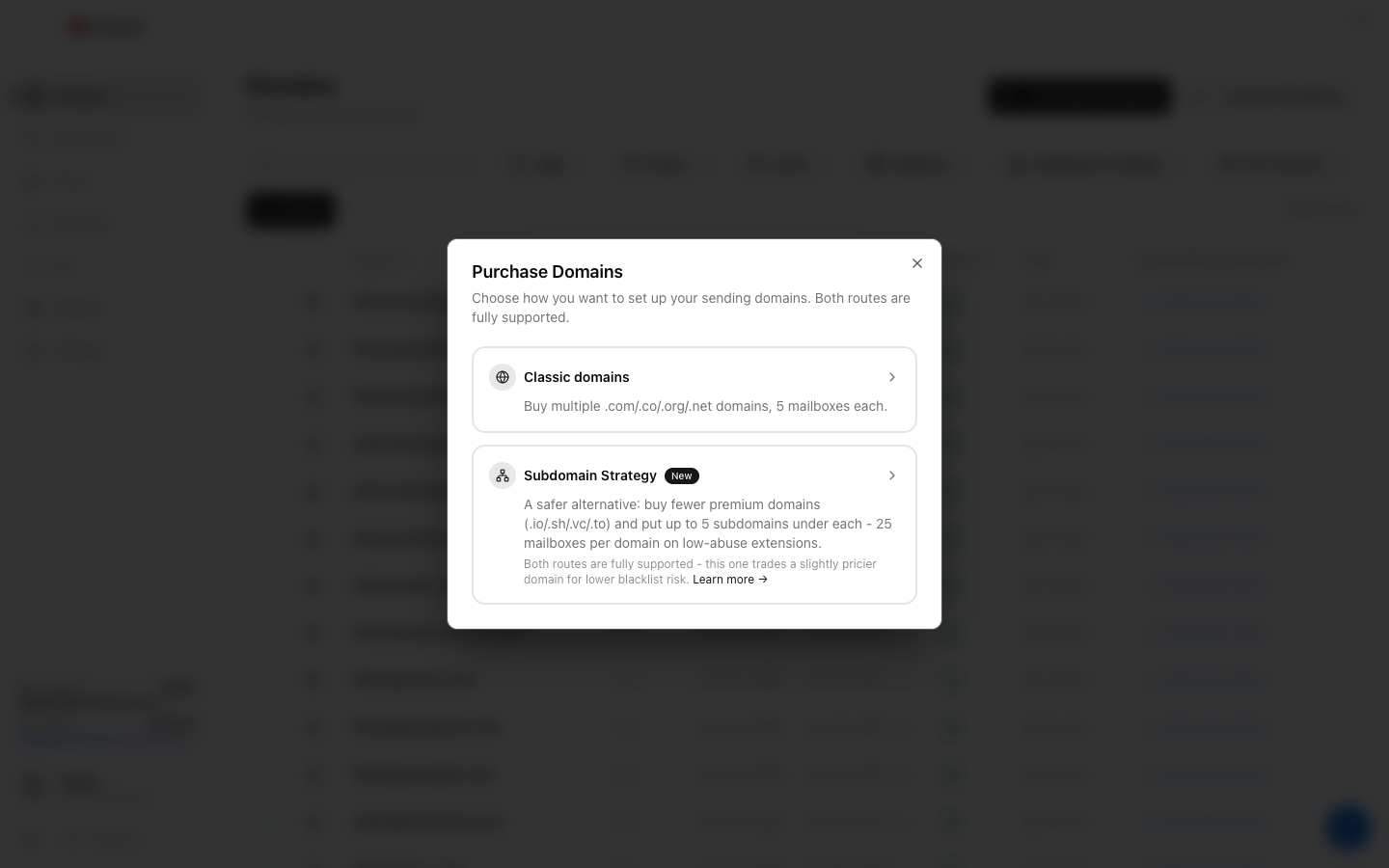
1. Open Purchase Domains and pick Classic
On the Domains page, click "Purchase Domain(s)". Winnr offers two routes. Classic domains buys multiple .com/.co/.org/.net domains with 5 mailboxes each. The Subdomain Strategy buys fewer domains and puts up to 5 subdomains under each. For a typical cold-email setup, choose Classic domains.
-
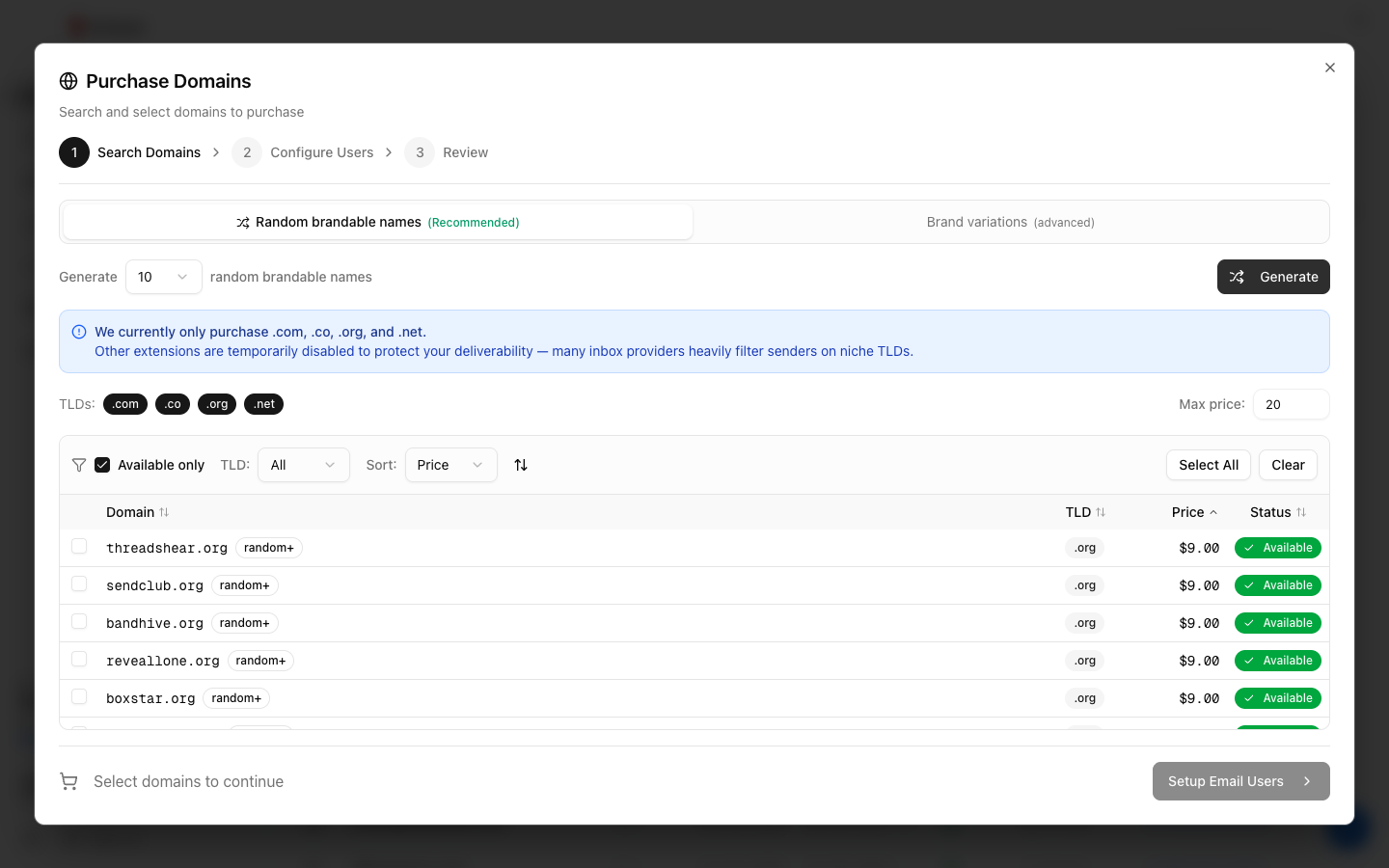
2. Generate or search for names
The default mode is "Random brandable names (Recommended)". Pick how many to generate (5, 10, 25, or 50) and click Generate. Winnr returns available invented names that don't share a spam-filter fingerprint with your real brand. "Brand variations (advanced)" lets you type a keyword, but it warns that look-alike names cluster in spam filters. Only .com, .co, .org, and .net are available here, and a Max price filter (default $20) hides anything more expensive.

-
3. Select the domains you want
Tick the checkboxes for the domains to buy (or Select All). The bar at the bottom tracks how many are selected and the running total. Each result shows its one-time price. Then click "Setup Email Users".
-
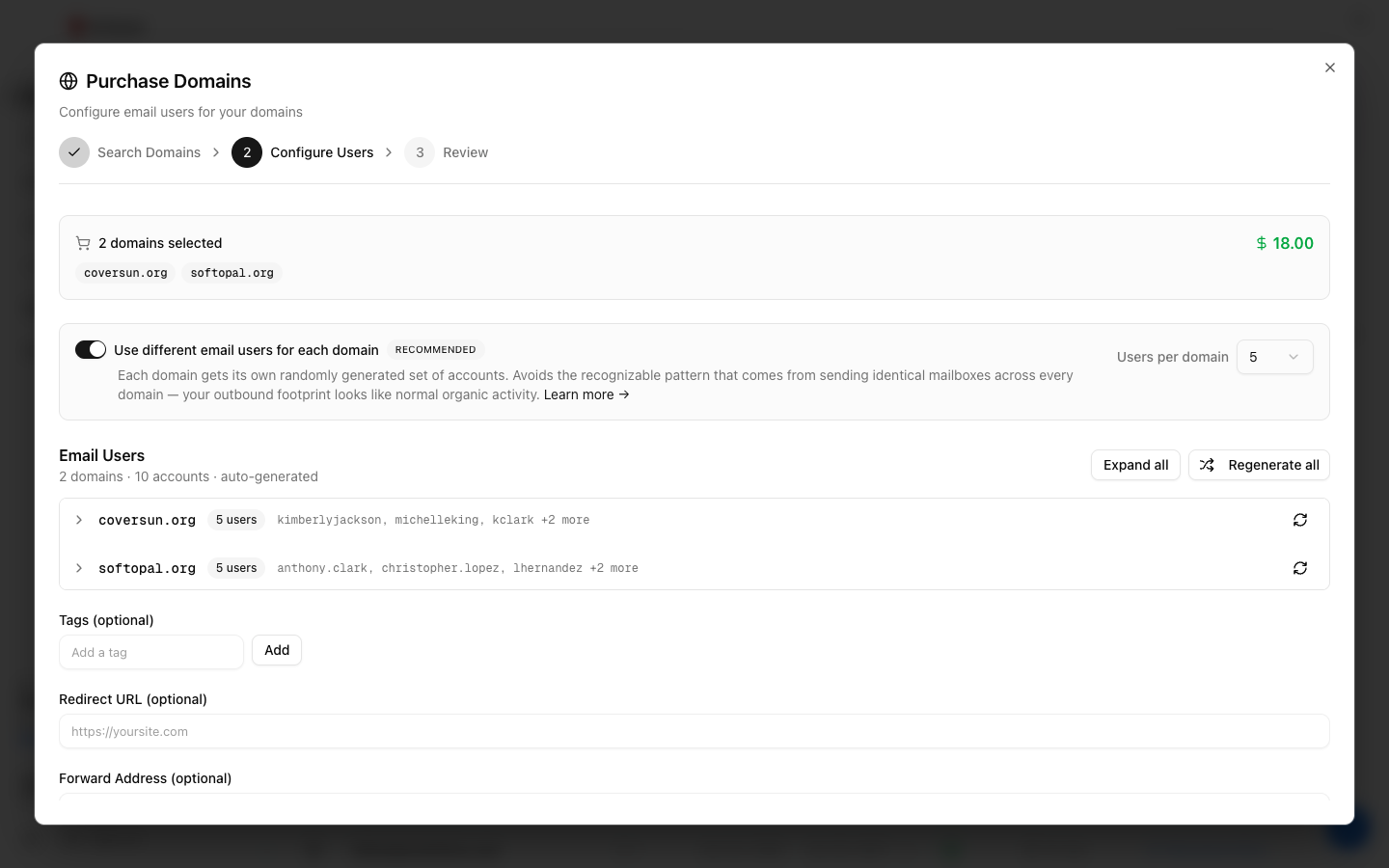
4. Configure the mailboxes (this wizard also creates them)
Buying domains here also creates mailboxes on them in the same order. "Use different email users for each domain" is on by default (recommended, because it avoids an identical-mailbox pattern across domains), with 5 users per domain by default. Winnr auto-generates realistic names; change the count (1-10 per domain), regenerate, or edit any name. You can also add optional tags, a redirect URL, and a forwarding address for the whole order. The forwarding address receives a copy of every email that reaches the new mailboxes. Then click Continue.
-
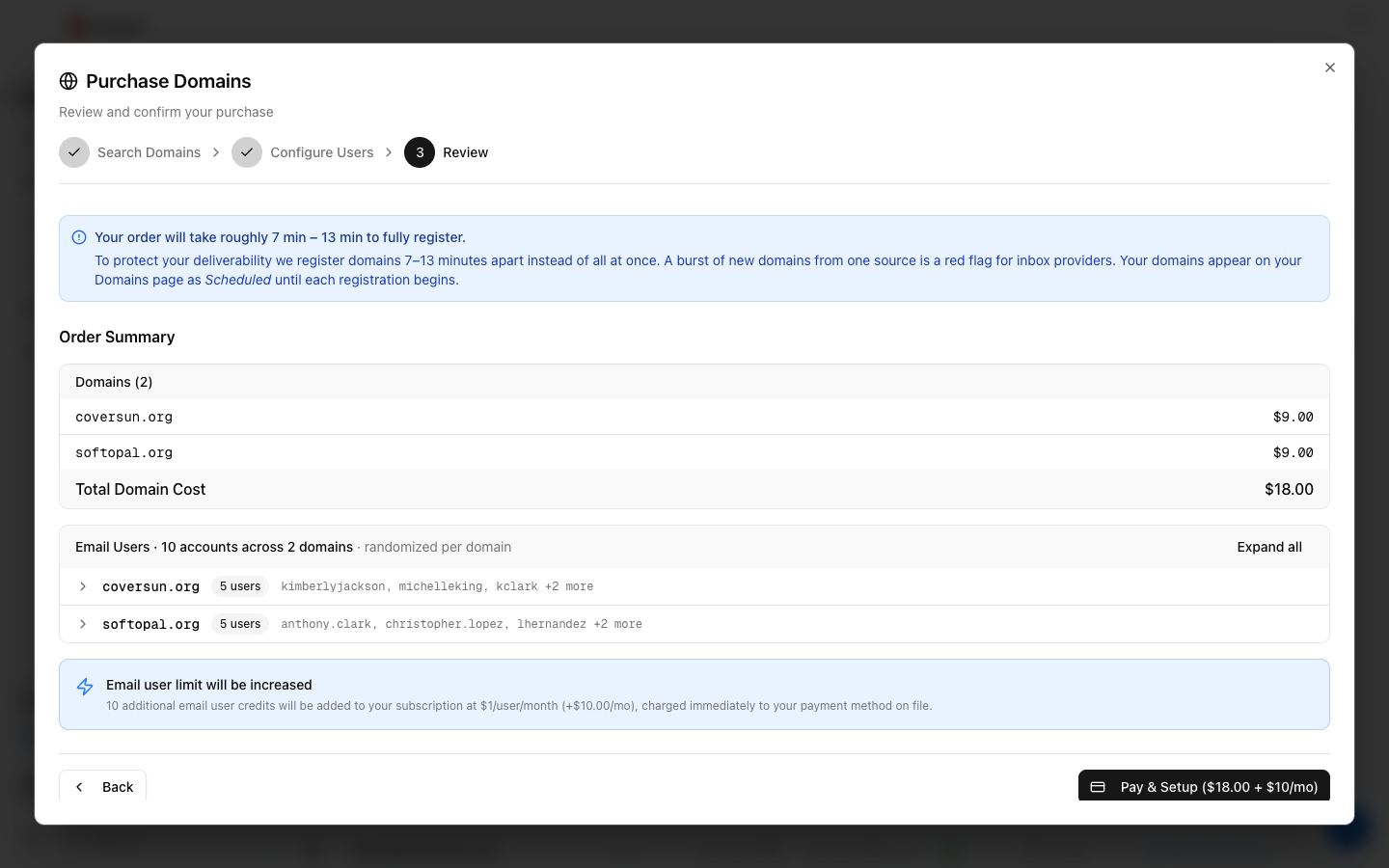
5. Review and pay
The Review step shows the one-time domain total and the mailboxes to be created. If those mailboxes push you over your plan's email-user limit, a notice explains that the extra ones are added as email-user credits at $1/user/month, charged immediately to your payment method on file. The final button reads "Pay & Setup" with the domain total (and any monthly add-on). For multi-domain orders the Review step also shows roughly how long the whole order will take to register.
-
6. Watch the domains go live
After you pay, each domain registers, gets its DNS set up, and has its mailboxes created in the background. A single domain is usually ready within a few minutes. In a multi-domain order the first domain starts right away and the rest follow 7-13 minutes apart, so a big order can take a few hours to finish. On the Domains page a waiting domain shows as Pending, then Setting up, then Active.
Frequently asked questions
Does buying a domain also create mailboxes?
Yes. The wizard's Configure Users step creates mailboxes on every domain you buy, 5 per domain by default. You can lower this to 1 or raise it to 10 per domain, and you can edit the auto-generated names. You can always add or remove mailboxes later from the Email Users page.
What will I actually be charged?
The domains are a one-time charge, shown next to each name before you select it. The mailboxes are free up to your plan's email-user limit, and any beyond it are billed as email-user credits at $1/mailbox/month, charged immediately. The Review step spells out both before you pay. If your payment fails, nothing is registered and you're asked to update your payment method.
What are domain credits?
If your account has domain credits, the search step shows a banner. Each credit takes up to $15 off one domain, which covers most .com names in full.
What TLD should I buy?
Classic registers .com, .co, .org, and .net. .com has the best deliverability track record, with the others close behind. Premium extensions (.io, .sh, .vc, .to) are only available through the Subdomain Strategy. Other extensions (.ai, .xyz, .info, and so on) aren't registrable through Winnr.
Why are my domains Pending instead of Active?
When you buy several at once, Winnr deliberately registers them 7-13 minutes apart rather than all together, because a burst of brand-new domains from one source is a red flag to inbox providers. The Review step calls these domains Scheduled; on the Domains page each one shows as Pending until its registration begins, then goes through Setting up to Active. Nothing is wrong.
Can I choose a specific name?
Switch to "Brand variations (advanced)" and type your keyword. Winnr checks availability live. Names closely tied to your brand are easier for spam filters to cluster, which is why random brandable names are the default.
A domain I picked disappeared at checkout. What happened?
Occasionally a name is registered by someone else between your search and your payment. Winnr tells you which names couldn't be bought, and you aren't charged for them.
What does the Forward Address field do?
It's optional. Enter a real inbox you already check and, once each domain is set up, a copy of every email that reaches its mailboxes is sent there too. The original still lands in the mailbox. It isn't a catch-all, so mail to an address that doesn't exist on the domain isn't forwarded. You can change or remove it later from the Domains page. See [Domain redirects and forwarding](/help/domains/domain-redirects.html).
How many domains can I buy at once?
There's no per-order limit, but your plan has a domain cap (Startup 10, Enterprise 40). If an order would exceed it, the wizard tells you before you continue. See [Increase your domain limit](/help/billing/domain-limit-increase.html).