The Subdomain Strategy is an alternative to buying many separate domains. You run up to 5 subdomains under one main domain, each a full sending domain with up to 10 mailboxes, so one registration can carry 50 mailboxes. Three ways to use it. Buy a new domain in the Purchase Domains wizard (.com, .net, .org, .co, or a premium .io, .sh, .vc, .to). Connect a domain you host elsewhere with "Connect in subdomain format". Or convert a domain you already have for free under Settings → Tools → Subdomain Strategy.
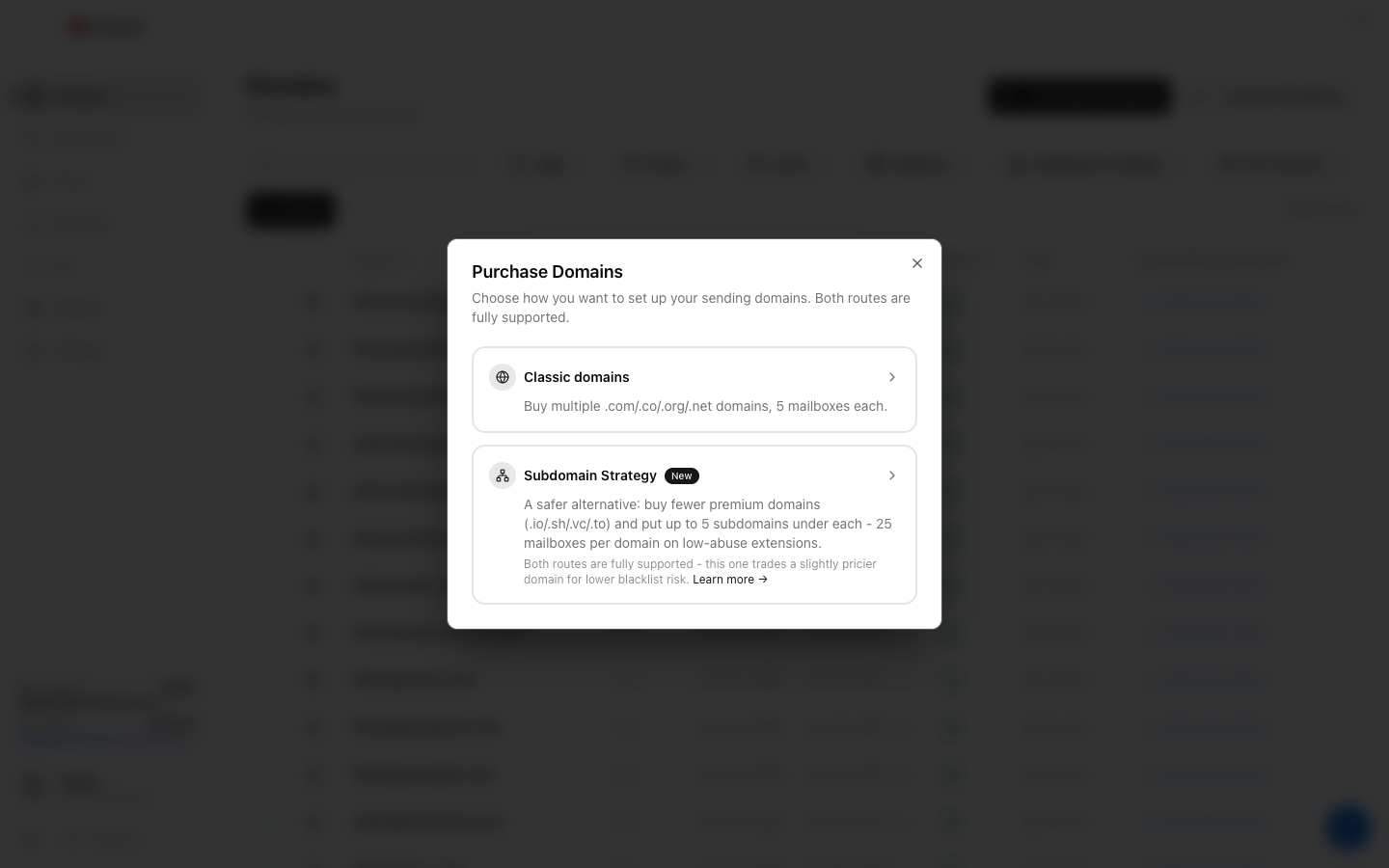
Three ways to start
- Buy through Winnr. Click Purchase Domain(s) and choose Subdomain Strategy. The wizard walks through Domains, Subdomains, Mailboxes, and Review. Pick one or more main domains (.com, .net, .org, .co, or premium .io, .sh, .vc, .to) and up to 5 subdomain names for each. Winnr registers the domain and sets everything up.
- Connect a domain you host elsewhere. In the Connect Domain dialog, tick "Connect in subdomain format" and choose up to 5 subdomain names. Your main domain's DNS stays completely untouched. Winnr adds records only at the subdomain level (through manual records or a Cloudflare API token), so this is the safe way to use a live business domain.
- Convert a domain you already have. Settings → Tools → Subdomain Strategy converts a domain you bought through Winnr, or one you connected by pointing its nameservers at Winnr. It's free, works on any TLD, registers nothing new, and leaves existing mailboxes in place.
When to pick the Subdomain Strategy
It's a good fit when:
- You want fewer domains to manage overall
- You like the option of a premium low-abuse extension (.io, .sh, .vc, .to), or you want to get more out of a domain you already have
- You're comfortable with the cluster risk (a blocklisting on the main domain affects all its subdomains)
Classic domains (many separate .com/.co/.org/.net domains) is what most customers still pick. Each domain is independent, so one problem stays contained. Both routes are fully supported.
What it looks like in your account
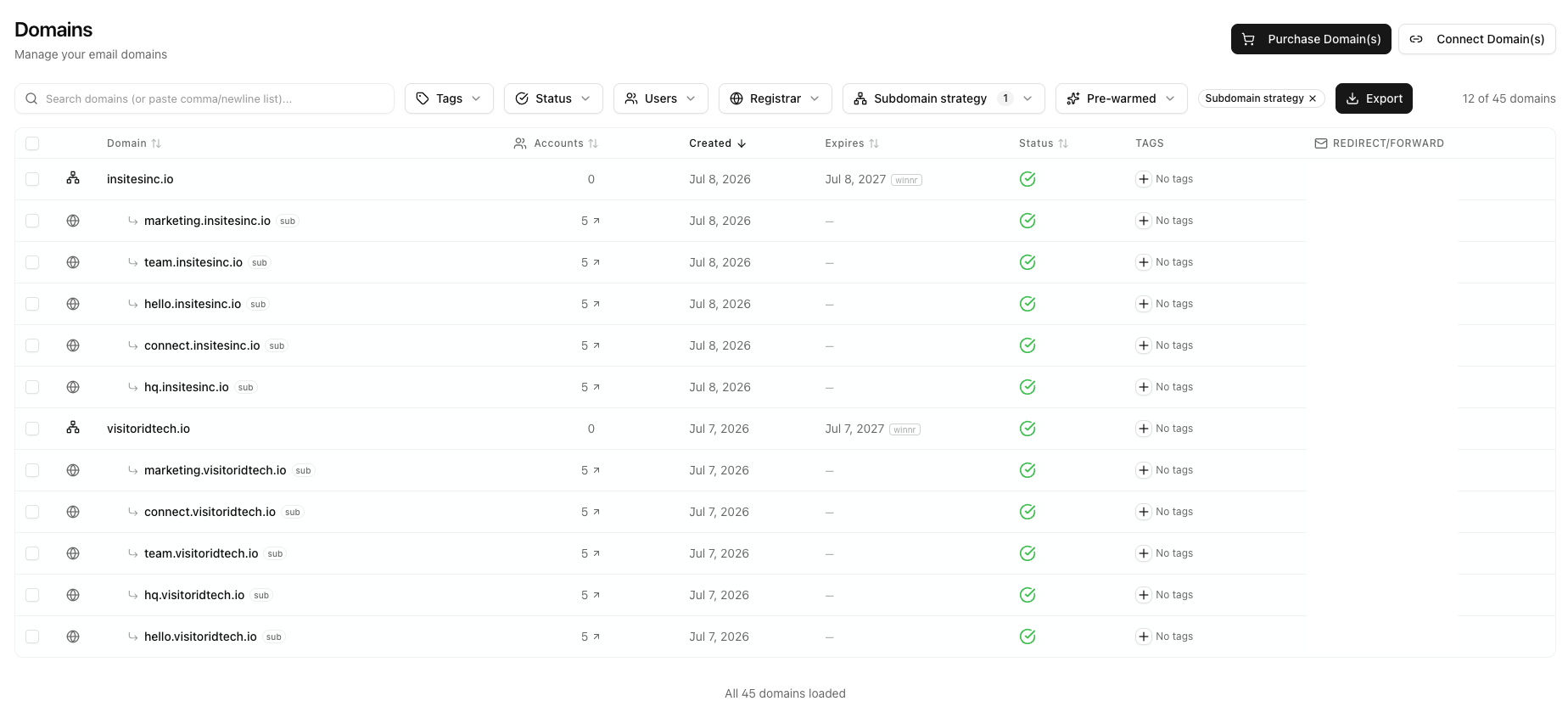
Each main domain appears in your Domains list with its subdomains nested underneath, each marked "sub". Up to 10 mailboxes per subdomain, up to 5 subdomains per main domain. Use the "Subdomain strategy" filter on the Domains page and choose "Subdomain strategy only" to see just these domains.
How the math works
Classic setup for 100 mailboxes: - 20 domains × 5 mailboxes each = 100 mailboxes - 20 domain registrations, each a one-time cost - 20 domains to monitor
Subdomain Strategy for 100 mailboxes: - 2 main domains × 5 subdomains × 10 mailboxes = 100 mailboxes - 2 domain registrations (premium extensions cost more per domain than a .com; subdomains are free) - 2 main domains to monitor, with each subdomain getting its own mail records
What subdomain names to pick
Subdomain names should sound neutral. Safe patterns:
marketing.yourcompany.ioteam.yourcompany.iohq.yourcompany.iohello.yourcompany.ioconnect.yourcompany.io
Names that read as cold-email signals are rejected outright, and the wizard suggests neutral names by default.
What's next
Frequently asked questions
How does this compare to buying many separate .com domains?
Cost: you register far fewer domains, and subdomains themselves are free. Management: fewer domains to keep track of. Risk: if one main domain gets blocklisted, all its subdomains are affected, so a single problem can hit more mailboxes at once. Classic domains, where each domain is independent, is still what most customers pick. The Subdomain Strategy is an alternative route, and both are fully supported.
Which TLDs are available?
When you buy through the Subdomain Strategy wizard you can choose .com, .net, .org, or .co, or one of the premium low-abuse extensions .io, .sh, .vc, and .to. The premium extensions can only be bought through this wizard, not through Classic. The converter (Settings → Tools) and the connect flow's subdomain format accept any TLD, because they don't register anything new.
How many mailboxes per subdomain?
Up to 10 per subdomain, and up to 5 subdomains per main domain, so 50 mailboxes per main domain. The main domain itself doesn't need any mailboxes, which keeps it clean.
Which subdomain names can I use?
Short, neutral words such as marketing, hq, hello, team, connect, sales, growth, get, try, or meet. Names can use lowercase letters, numbers, and hyphens (up to 30 characters). The wizard blocks labels that read as cold-email signals, and labels reserved for mail and DNS setup (such as www, mail, smtp, imap, and inbound).
Can I mix Classic and Subdomain Strategy?
Yes. Some customers run a few Subdomain Strategy domains alongside a set of Classic domains. Winnr treats them the same in the app.
Can I convert a domain I already have?
Yes, with the converter under Settings → Tools → Subdomain Strategy. It works on domains you bought through Winnr, and on domains you connected by pointing their nameservers at Winnr. It's free, works on any TLD, and registers nothing new. Existing mailboxes on the main domain stay as they are. You pick subdomain names and Winnr sets them up, optionally creating mailboxes straight away (extra mailboxes beyond your plan's limit are billed as email-user credits). An aged domain with history is a good candidate.
Why isn't my domain showing in the converter?
The converter skips domains that aren't eligible, and tells you why when nothing qualifies. Common reasons are that the domain was connected with a Cloudflare API token or manual DNS records (Winnr doesn't host its DNS, so use "Connect in subdomain format" instead), it's still being set up, it's already a subdomain, it's a pre-warmed marketplace domain, or it already has 5 subdomains.
Can I add more subdomains later?
Yes. Run the converter again on the same domain and add new names, up to 5 subdomains in total.
Can I use the Subdomain Strategy with a domain I host elsewhere?
Yes. When connecting the domain, tick "Connect in subdomain format" in the Connect Domain dialog. Winnr never touches your main domain's DNS (no MX or SPF at the main domain), so it's safe even for a live business domain, and mail runs entirely on the subdomains. This works with manual DNS records (grouped per subdomain, with a CSV download) or a Cloudflare API token. Pointing the whole domain's nameservers at Winnr isn't offered in subdomain format, since the point is to leave your zone alone.