On the Email Users page, click "Add Email User". Select one or more active domains, then enter up to 10 users (full name and username, the "sam" in sam@yourdomain.com). Each user is created on every selected domain. Review and click "Create Email Users". Winnr generates a strong password for each mailbox; you can see and copy it in the Password column. Most domains hold up to 10 mailboxes. If you go over your plan's mailbox limit, extra mailbox credits at $1/month each are added as part of the same step.
A quick note on names
Winnr uses a few words for the same thing. Email user, mailbox and email account all mean one sending inbox on your domain (for example sam@yourdomain.com). The sidebar meter shortens it to "Emails". Wherever you see any of these, it's the same thing.
Naming rules
The name matters for cold-email deliverability.
Use:
- Real first names: sam@, alex@, jordan@
- First name plus initial: samj@, alexb@
- First and last name: sam.chen@, alexbaker@
Avoid:
- sales@, marketing@, info@: generic role addresses look like bulk sending.
- noreply@: obviously automated.
- Numbers like sam123@: look generated.
The Full Name you enter becomes the mailbox's display name, the name recipients see in the From field. You can change it later.
What you get with each mailbox
- SMTP details for sending (host, port, username, password)
- IMAP details for reading replies
- SPF, DKIM and DMARC alignment from the domain
- A daily sending limit, shown in the Daily Limit column
- A place in the universal inbox, if you've turned it on
The mailboxes are standard IMAP/SMTP, so they work with any mail client, sending tool or automation.
After creating
From each mailbox's row you can view its inbox, send an email, enable warming (flame icon), edit its display name or password, or delete it.
What's next
- Export credentials to your sending tool
- Turn on warming for the new mailboxes
- Save a reusable mailbox template
Step-by-step
-
1. Open Email Users
App sidebar → Email Users → Add Email User (top right). If you don't have a plan yet, the button takes you to choose one instead.
-
2. Select domains
Pick one or more domains. Only active domains are listed. Every user you add in the next step is created on each selected domain.
-
3. Configure users
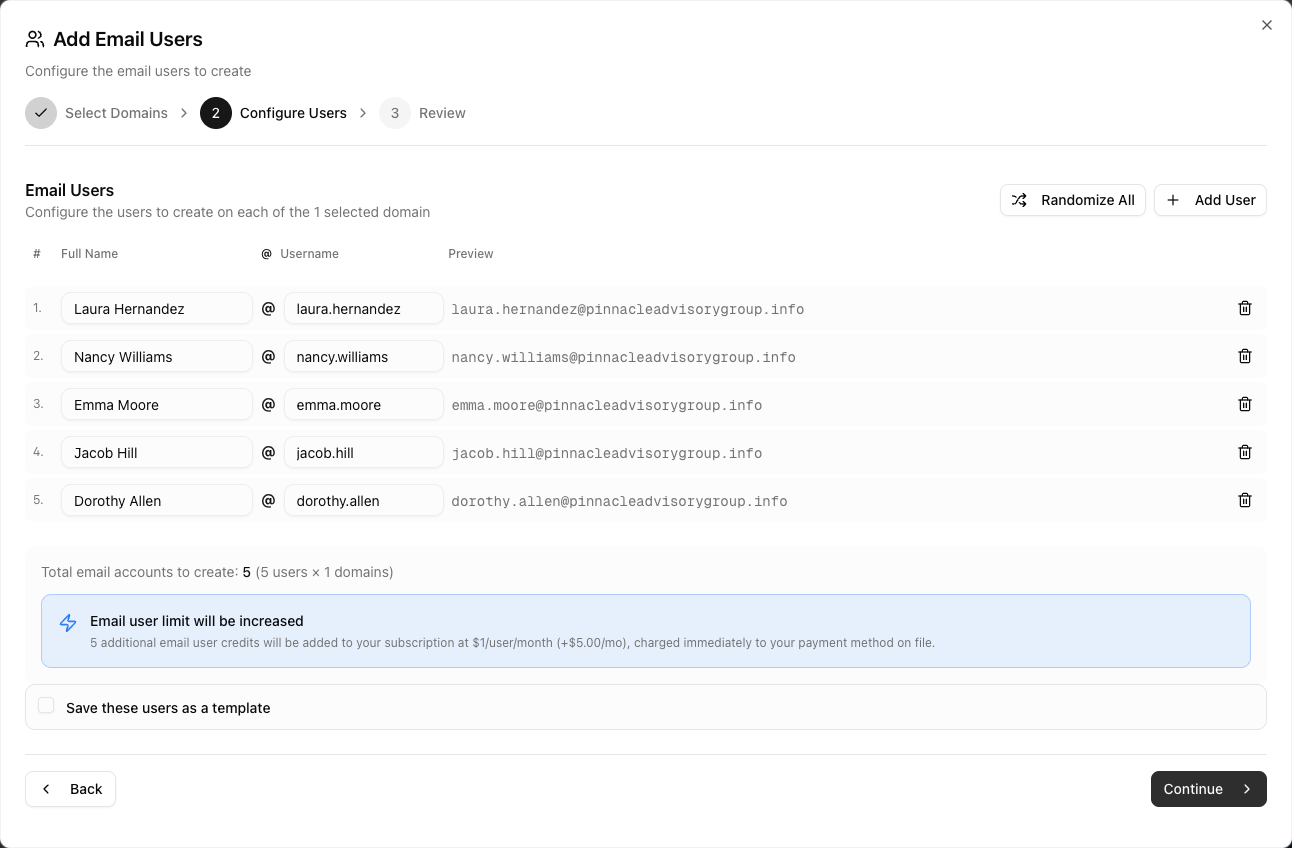
Enter a Full Name and Username for each mailbox; a live preview shows the resulting address. The dialog pre-fills realistic names. Click Randomize All to reshuffle, Add User for more rows (up to 10 per batch), or Apply Template to load a saved set.
-
4. Optionally save as a template
Tick "Save these users as a template" and give it a name to reuse the same names and usernames on future domains.
-
5. Review and create
The review step shows the total mailboxes to create (users × domains) and any extra cost. Click "Create Email Users". The mailboxes are created in the background and appear in the list within moments.
Frequently asked questions
Can I set the password myself?
Not while creating in the app; Winnr generates a strong one. You can change it afterwards with the Edit (pencil) icon on the mailbox's row, using at least 8 characters. Through the API or MCP server you can pass your own password at creation.
Where do I find the password?
In the Password column on the Email Users page. Click the eye icon to show it or the copy icon to copy it. Exports include passwords too.
How many mailboxes can a domain have?
Usually 10. The dialog warns you and won't submit if a domain would go over its limit. Winnr's recommendation for cold email is around 5 per domain.
Can I create the same usernames on many domains at once?
Yes, that's how the dialog works. Select several domains and every user is created on each of them, so sam@domain-a.com, sam@domain-b.com and so on in one go.
What if I run out of mailbox slots?
On a paid plan you can keep going. The review step shows how many extra mailbox credits are needed ($1 per mailbox per month) and the button reads "Create Email Users (+$N/mo)". You can also manage credits in Settings → Subscription or upgrade to Enterprise. See [Mailbox limits](/help/mailboxes/mailbox-limits.html).
What about mailboxes on a pre-warmed domain?
New mailboxes on a pre-warmed marketplace domain are billed at $3 per address per month on your pre-warmed subscription, with the first month charged when you create them. They don't use your plan's mailbox slots or credits.
Can the Winnr Agent create mailboxes for me?
Yes. Ask the Winnr Agent in the chat panel, for example "create sam and alex on acme.com". It prepares the mailboxes and you click Confirm to create them.