On the Warming page, click "Enable Warmup" (or "Start Warming" if nothing is warming yet). Pick mailboxes by domain or individually, set target emails per day (1 to 20, default 20) and a ramp-up speed (Slow, Normal or Fast, default Normal), then click "Enable Warmup (N)". Warming costs $0.60 per mailbox per month; the first month for the newly selected mailboxes is charged right away, and warming only starts once that payment succeeds. You can also enable it from the Email Users page or ask the Winnr Agent to do it.
Choosing volume and ramp speed
Warming has two settings you choose when you enable it:
- Target emails/day: how many warmup emails a day the mailbox works up to. Range 1 to 20, default 20. Lower it (say 5 to 10) if you want to treat a brand-new domain gently.
- Ramp-up speed: how fast the mailbox climbs to that target.
- Slow: the most gradual ramp. Best for brand-new domains.
- Normal: the default. Fine for most setups.
- Fast: the quickest ramp. For established domains with a clean history.
If you're unsure, leave volume at 20 and ramp on Normal. You can change both later per mailbox, or in bulk. See Warming settings.
The reply rate inside the warming network is fixed and managed by Winnr. There's nothing to set there.
Other places to enable warming
- Email Users page: click the flame icon on a mailbox row, or select several rows and click Enable Warmup (N) in the selection bar.
- Winnr Agent: ask in the chat panel and click Confirm on the action card.
- API and MCP: the same settings are available through the API. See the API docs.
What to expect after enabling
- Right away: the mailboxes show up on the Warming page with status Active (or Connecting while they're being set up).
- First days: volume starts low and grows according to the ramp speed. Health score and inbox rate read "Syncing..." until the first data arrives, then start filling in.
- Week 1 to 2: health score and inbox rate reflect real reputation signals.
- After 2 weeks (4 on a new domain): start real cold sending at low volume, 10 to 20 cold emails per mailbox per day, and keep total sending (cold plus warming) at 50 a day or less per mailbox.
What's next
Step-by-step
-
1. Open the Warming page
App sidebar → Warming. If no mailboxes are warming yet, you'll see an intro screen with a "Start Warming" button. Otherwise click "Enable Warmup" at the top right.
-
2. Select mailboxes
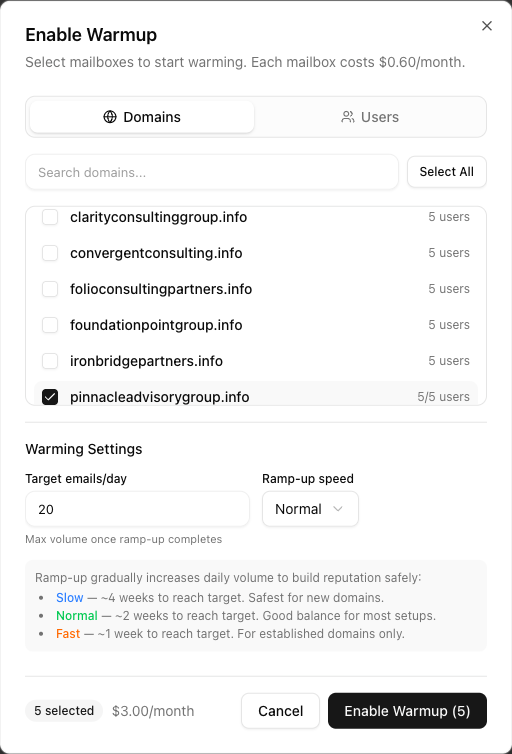
The Enable Warmup dialog opens. Switch between Domains (select every mailbox on a domain at once) and Users (pick individual mailboxes). Use Select All to take everything in the list. Only active mailboxes that aren't already warming are listed.
-
3. Pick volume and ramp speed
Set Target emails/day (1 to 20; 20 is the default and the maximum) and a Ramp-up speed. Slow is the most careful and suits brand-new domains. Normal is the default and fits most setups. Fast is for established domains.
-
4. Review the cost and confirm
The footer shows how many mailboxes are selected and the monthly cost ($0.60 × mailboxes). Click "Enable Warmup (N)". The first month for those mailboxes is charged immediately. If the payment fails, nothing is enabled and the dialog shows the reason.
-
5. Let it run
Enabling runs in the background with a progress counter, and you can close the dialog while it finishes. Mailboxes appear on the Warming page as they're enabled. The first metrics show up after the next sync; health and inbox rate become meaningful after a few days of sending.
Frequently asked questions
Can I enable warming on many mailboxes at once?
Yes. The Enable Warmup dialog is multi-select, and the Domains view selects every mailbox on a domain in one click. On the Email Users page you can also tick rows and click "Enable Warmup (N)" in the selection bar, or use the flame icon on a single row.
Can the Winnr Agent turn warming on for me?
Yes. Ask the Winnr Agent in the app's chat panel, for example "enable warming on every mailbox on acme.com". It prepares the action and you click Confirm to run it.
Does warming send from my mailbox to real prospects?
No. Warmup emails are exchanged with Winnr's warming network only. Your real cold campaigns run separately through your sending tool.
How is warming billed?
$0.60 per warming mailbox per month. When you enable, the first month for the newly selected mailboxes is charged straight away (not prorated). After that, warming renews with your regular billing cycle. Disabling stops the charge from the next cycle. See [Warming billing](/help/warming/warming-billing.html).
Can I warm a Gmail or Outlook account I own outside Winnr?
Yes. Use Import External on the Warming page. See [Warm external Gmail / Outlook accounts](/help/warming/import-external.html).
How long does warming need to run?
At least 2 weeks before you start cold sending, and 4 weeks is better on a brand-new domain. You can keep warming on after that at low volume if you like; it's optional.
Why don't I see the Enable Warmup button?
It only appears when you have active Winnr mailboxes that aren't warming yet. If every mailbox is already warming, there's nothing left to enable.