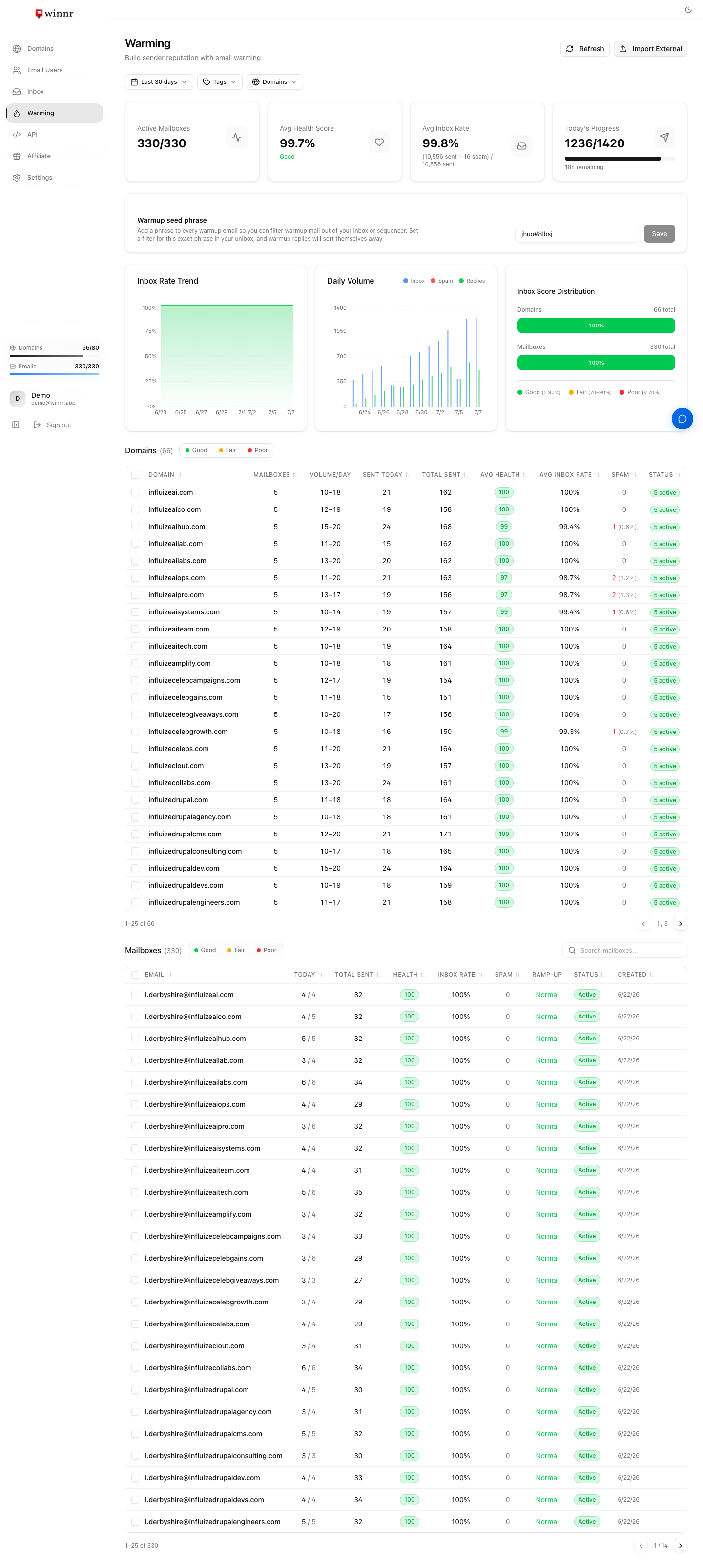
Warming exchanges realistic emails, with replies, between your mailbox and a shared warming network of real mailboxes, so the mailbox builds a steady sending history before you send cold email. Volume starts low and ramps up to your daily target (up to 20 warmup emails a day). Winnr does not choose which email providers the network's mailboxes use and cannot aim warming at one, and the network can include very few Outlook.com, Hotmail or Yahoo addresses. Warm a new mailbox for at least 2 weeks (4 on a brand-new domain), and run a seed placement test before relying on it for a specific provider. It costs $0.60 per mailbox per month.
What warming actually does
Email providers judge each sender partly on its history. A new mailbox has none, so its first messages get extra caution.
Warming gives the mailbox a history of clean, two-way email before you start cold sending:
- Volume ramp: start low and grow gradually. A mailbox that jumps from nothing to 100 emails a day looks suspicious.
- Realistic content: messages that read like normal correspondence.
- Positive engagement: warmup messages get replies and positive actions from the warming network, which are good reputation signals.
- Steady cadence: sending consistently every day, not in bursts, matches how legitimate senders behave.
After a few weeks of this, the mailbox has a steady sending record. That history is built with the providers the warming network's mailboxes actually use, which is the next point.
Which providers warming reaches
Warmup mail goes to, and comes from, the mailboxes in a shared warming network. Winnr does not run that network's mailboxes or choose where they are hosted, so:
- You can't aim warming at a provider. There is no setting to warm toward Gmail, Microsoft 365, Outlook.com, Hotmail, Yahoo or anyone else.
- Coverage of some providers can be very low. Consumer Outlook.com, Hotmail and Yahoo addresses can be a very small part of the network. In one customer's account, 6 mailboxes sent 2,929 warmup emails over two months: 4 went to Outlook.com or Hotmail addresses and none went to Yahoo.
- Warming is not a provider-specific test. A mailbox can warm cleanly and still land in spam at a provider the network barely reaches.
What the health score measures
Each warming mailbox gets a health score from 0 to 100. It is based on the share of the mailbox's warmup emails and replies that landed in spam over the last 14 days: health = 100 minus 2 × that spam rate. Both counts cover the same 14 days.
That is spam placement inside the warming network, across all of its providers together. It is not inbox placement at Gmail, Outlook, Yahoo or any other specific provider. A high score is a good sign that the mailbox and domain are set up and behaving well. It does not show that a given provider will put your cold email in the inbox. See Reading the warming metrics for every number on the Warming page.
Check placement before you rely on a mailbox
Before you treat a mailbox as ready for prospects at a specific provider, run a seed placement test:
- Get test addresses at the providers your prospects use (for example Gmail, Microsoft 365, Outlook.com and Yahoo). A seed testing service gives you a ready-made list, or use a few test accounts of your own.
- Send a normal-looking test email from the mailbox, using the copy you plan to send, to each address.
- Check which folder it landed in at each provider: inbox, promotions or other tab, or spam.
Repeat the test after big changes to volume, copy or the sending tool, and when a provider you care about starts underperforming.
The volume curve
Warming volume starts at a few emails a day and climbs to your daily target (up to 20). How fast it climbs depends on the ramp-up speed you pick:
- Slow: the most gradual. Best for brand-new domains.
- Normal: the default.
- Fast: the quickest, for established domains.
You can also turn ramp-up off for a mailbox, in which case it sends at its daily target straight away. That's only sensible for mailboxes that already have a sending history. Change these per mailbox in Warming settings.
When warming isn't enough
Warming builds reputation, but it can't overcome:
- Bad content. Spammy subject lines, all-caps text or manipulative openers get filtered even from warmed mailboxes.
- Too much volume too fast. Keep cold sending to 10 to 20 per mailbox per day, and total sending (cold plus warming) to 50 a day or less.
- Bad lists. Sending to invalid addresses generates bounces, which hurt reputation quickly. Verify your list before sending.
- Spam complaints. Recipients marking your messages as spam is the most damaging signal there is. A small complaint rate can undo weeks of warming.
Warming is necessary but not sufficient. Combine it with clean lists, good copy and a gradual campaign ramp.
Warming yourself vs. buying pre-warmed
Two paths to a warmed mailbox:
- Buy or connect a domain and warm it yourself. Create mailboxes, enable warming, wait 2 to 4 weeks. Cost: $0.60 per mailbox per month for warming (while it's enabled) plus the one-time domain cost.
- Buy pre-warmed from the marketplace. Skip the warming period. Cost: $3 per address per month, no minimum term.
Pre-warmed is faster; warming yourself is cheaper over time. See Pre-warmed marketplace.
What's next
Frequently asked questions
Do I really need to warm?
For a new mailbox on a new domain, almost always. Sending cold email from a brand-new mailbox with no history is the fastest way to land in spam and damage the domain's reputation for the long term.
What if the domain is already aged?
Aged domains usually warm faster, and a Fast ramp can suit them. A domain that has already been sending clean email for months may not need warming at all. Pre-warmed domains from Winnr's marketplace are sold already warmed, so you can start sending without a warming period.
Can I warm a mailbox specifically for Outlook, Hotmail or Yahoo?
No. The warming network's provider mix is not something Winnr controls or can target, and consumer Outlook.com, Hotmail and Yahoo addresses can make up a very small share of it. If those providers matter to you, check placement there directly with a seed test before sending.
Does a high health score mean my mail will reach the inbox at Gmail or Microsoft?
Not on its own. The score measures how much warmup mail landed in spam inside the warming network over the last 14 days, across whatever providers that network uses. It is not a placement measurement at any specific provider. A seed placement test is the way to check a specific provider.
Is Winnr's warming safe?
Warming traffic is designed to look like normal correspondence and stays inside Winnr's warming network. That said, email providers change their filtering over time, and no warming service can promise permanent results.
How long should I warm?
At least 2 weeks before cold sending, and 4 weeks is better on a brand-new domain. After that you can start real campaigns at low volume and keep warming running alongside if you want extra safety.
Can I warm and send cold at the same time?
Yes, most customers do once the initial warming period is over. Start real cold email at 10 to 20 per mailbox per day while warming continues, and keep total sending (cold plus warming) at 50 a day or less per mailbox.
Can the Winnr Agent manage warming for me?
Yes. The Winnr Agent in the app's chat panel can enable, pause, resume or disable warming and report on your warming mailboxes. Changes wait for you to click Confirm.