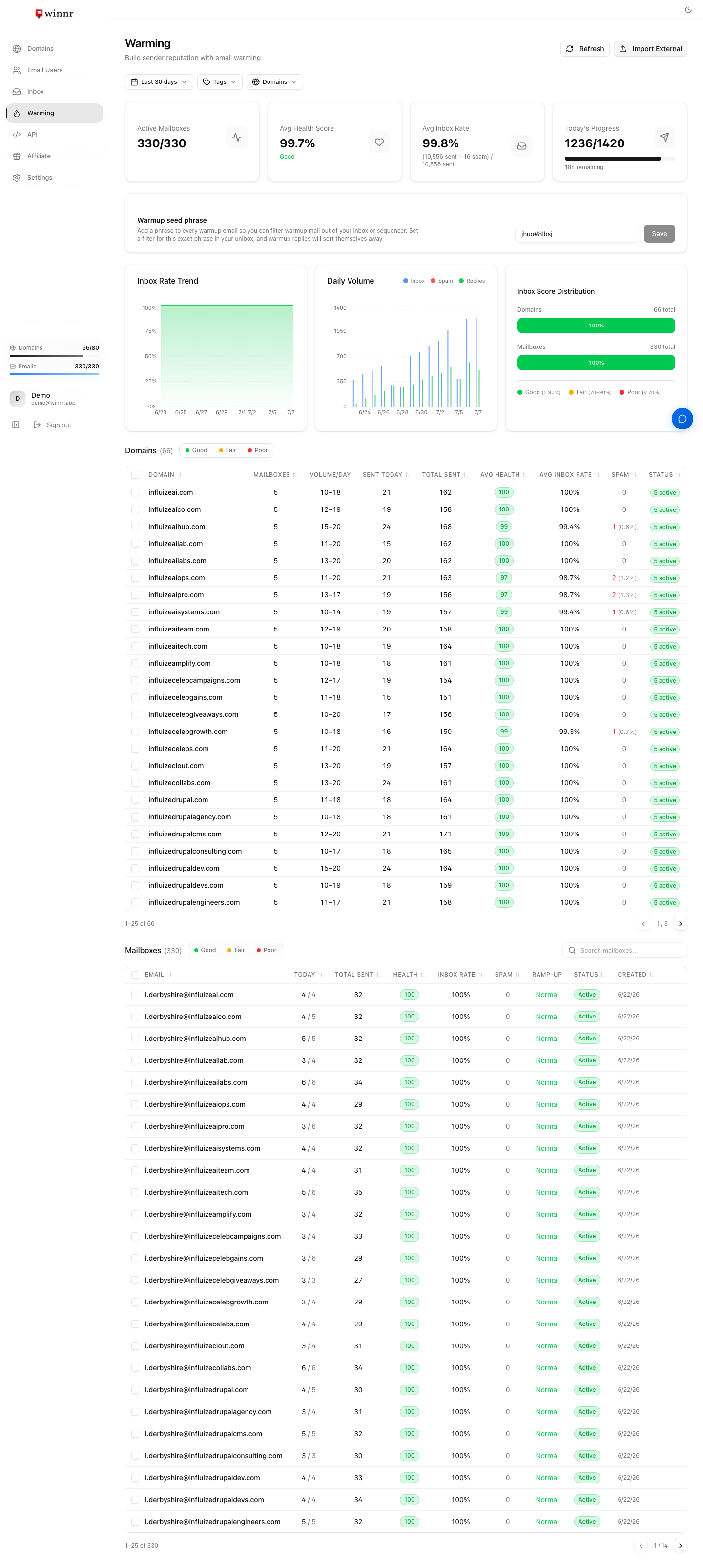
The top of the Warming page shows four cards: Active Mailboxes, Avg Health Score (with a Good / Fair / Needs attention label), Avg Inbox Rate, and Today's Progress (warmup emails sent vs scheduled today). Health score runs 0 to 100 and is calculated from the spam rate over the last 14 days (warmup emails and replies that landed in spam, divided by all sent in the same 14 days): health = 100 minus 2 × spam rate, so 80+ is Good, 50 to 79 is Fair and below 50 needs attention. It measures spam placement inside the warming network across all its providers, not inbox placement at any specific provider. Metrics refresh every few hours, whenever you open the Warming page, and when you click Refresh.
Filters
The row at the top of the Warming page lets you narrow everything below it:
- Date range: Last 7, 14 or 30 days (affects the charts).
- Tags and Domains: show only mailboxes on the chosen domains, or on domains carrying the chosen tags.
Click Refresh at the top right to pull the latest numbers. They also refresh automatically every few hours and each time you open the page.
The summary cards
- Active Mailboxes: mailboxes currently warming, out of all warming mailboxes (for example 18/20), with a count of any that are paused.
- Avg Health Score: the average health score across mailboxes that have data, labeled Good (80+), Fair (50 to 79) or Needs attention (below 50).
- Avg Inbox Rate: the share of warmup emails that stayed out of spam, across the mailboxes in view.
- Today's Progress: warmup emails sent today vs scheduled today, with how many remain. If nothing is scheduled on a Saturday or Sunday, the card says "Warming pauses on weekends".
If any mailbox can't be reached, a red badge shows how many have connection problems.
Health score
A 0 to 100 score for each mailbox, calculated from its spam rate over the last 14 days: health = 100 minus 2 × spam rate. The spam rate is the warmup emails and replies the mailbox sent in the last 14 days that landed in spam, divided by everything it sent in those same 14 days. A mailbox with no warmup mail landing in spam scores 100; one with 10% landing in spam scores 80.
What it measures, and what it doesn't. The score is spam placement inside the warming network, across whichever providers that network's mailboxes use. Winnr doesn't choose that provider mix, and some providers (consumer Outlook.com, Hotmail and Yahoo in particular) can make up a very small part of it. So the score is not inbox placement at Gmail, Outlook, Yahoo or any other specific provider. Use it to spot problems early and to track the trend, and use a seed placement test to check a specific provider before you rely on a mailbox there.
- 80 to 100 (green, Good): healthy. Ready for real sending once the warming period is over.
- 50 to 79 (yellow, Fair): still building, or slipping. Keep warming and watch the trend.
- Below 50 (red, Needs attention): something is wrong. Check DNS, blocklists and recent volume changes.
A mailbox with no data yet shows "--".
Inbox rate and spam
Inbox rate is the share of the last 14 days' warmup emails that did not land in spam: inbox rate = 100 minus spam rate. Promotions and other tabs count as not spam. The Spam column shows how many warmup emails landed in spam in the last 14 days, with the 14-day spam rate in brackets.
- Inbox rate 90% or higher: good.
- 70% to 90%: fair. Normal early on; concerning if it stays here after a couple of weeks.
- Below 70%: poor. Check DNS health, blocklists and your ramp speed.
Charts
- Inbox Rate Trend: inbox rate day by day across the selected date range. Sharp drops are often the first sign of a DNS or blocklist problem.
- Daily Volume: warmup mail per day split into Inbox, Spam and Replies. Volume should rise over the first weeks as the ramp works.
Inbox Score Distribution
Groups your domains and your mailboxes by inbox rate into Good (90% and up), Fair (70 to 90%) and Poor (below 70%). Click a bucket to filter the Domains and Mailboxes tables to just that group, which is the quickest way to find the weak spots in a large setup.
Domains table
One row per domain: Domain, Mailboxes, Volume/Day, Sent Today, Total Sent, Avg Health, Avg Inbox Rate, Spam and Status. Tick domains to set volume or ramp-up, pause, resume or disable warming for every mailbox on them at once.
Mailboxes table
One row per mailbox:
- Email, with a Google, Microsoft or External badge for imported mailboxes.
- Today: warmup emails sent today out of today's scheduled amount.
- Total Sent: warmup emails sent in the last 45 days, so it can go down as well as up. It shows volume; the spam rate is worked out over 14 days, so don't divide the Spam count by this number.
- Health: the mailbox's health score.
- Inbox Rate and Spam: as described above.
- Ramp-up: Slow, Normal, Fast, or Off.
- Status: Active, Paused, Connecting (being set up) or Problem (can't connect).
- Created: the date warming started.
The "..." menu on each row has Pause or Resume, Edit Settings, View Metrics, and Disable Warming (plus Delete Account for imported mailboxes). A mailbox showing Problem also gets Reconnect, which sends the mailbox's current password to warming and restarts it without losing its history. View Metrics opens that mailbox's health score, inbox rate, spam rate, total sent, replies and daily volume setting, with its own inbox-rate chart.
Mailboxes where warming is disabled don't appear on the Warming page.
What's next
Frequently asked questions
My health score is 65. Is that bad?
It's in the Fair range. That's common in the first week or two, when there's little data and a single spam placement moves the number a lot. Watch the trend. Rising means warming is working; flat or falling for several days is worth investigating.
Inbox rate is 60%. What's wrong?
That's low for a mailbox that's been warming for more than a week or two. Common causes are a DNS problem on the domain, a new blocklist listing, or a ramp that's too fast. Check the domain's DNS health first, then try a slower ramp-up speed.
Spam jumped overnight. What now?
Usually a DNS or blocklist issue. Check the domain's DNS health first. If that's fine, check blocklists. If both are clean, contact support@winnr.app.
What health score do I want before starting cold campaigns?
Aim for Good (80 or higher) and a steady or rising trend, after at least 2 weeks of warming (4 on a brand-new domain). Higher is better; a mailbox that's still Fair will underperform on real campaigns.
Why does it say "Syncing..."?
The mailbox hasn't reported any warmup activity yet. This is normal right after you enable warming. Numbers appear after the next sync.
Why is a mailbox's status Problem?
Winnr can't sign in to the mailbox to send or receive warmup mail. For a Winnr mailbox this usually follows a password change; for an external mailbox it's usually a revoked or wrong app password. A red badge above the tables counts mailboxes with connection problems. To fix it, open the "..." menu on the mailbox's row and click Reconnect, which sends the current password to warming and restarts it with its history kept. If Reconnect says it can't sign in, check the mailbox's password first. Contact support@winnr.app if a Winnr mailbox still shows Problem after a successful Reconnect.
Do the metrics predict real cold-email deliverability?
Only partly. They show whether warmup mail is landing in spam inside the warming network, which catches setup and reputation problems early. They don't measure placement at any specific provider, the network's provider mix isn't something Winnr controls, and it can include very few Outlook.com, Hotmail or Yahoo addresses. Real campaigns also have their own content, lists and volume. Before relying on a mailbox for a specific provider, run a seed placement test (the How email warming works article explains how).
Why did my health scores drop on October 4, 2026?
The calculation changed that day. Before, the spam count from the last 14 days was divided by the emails sent over the last 45 days, which made a recent rise in spam look up to several times smaller than it was. Now both counts cover the same 14 days. Your mailboxes didn't get worse overnight; the score now shows recent spam at its real size. If a score is lower than you'd like, see the Warming health score dropped article.