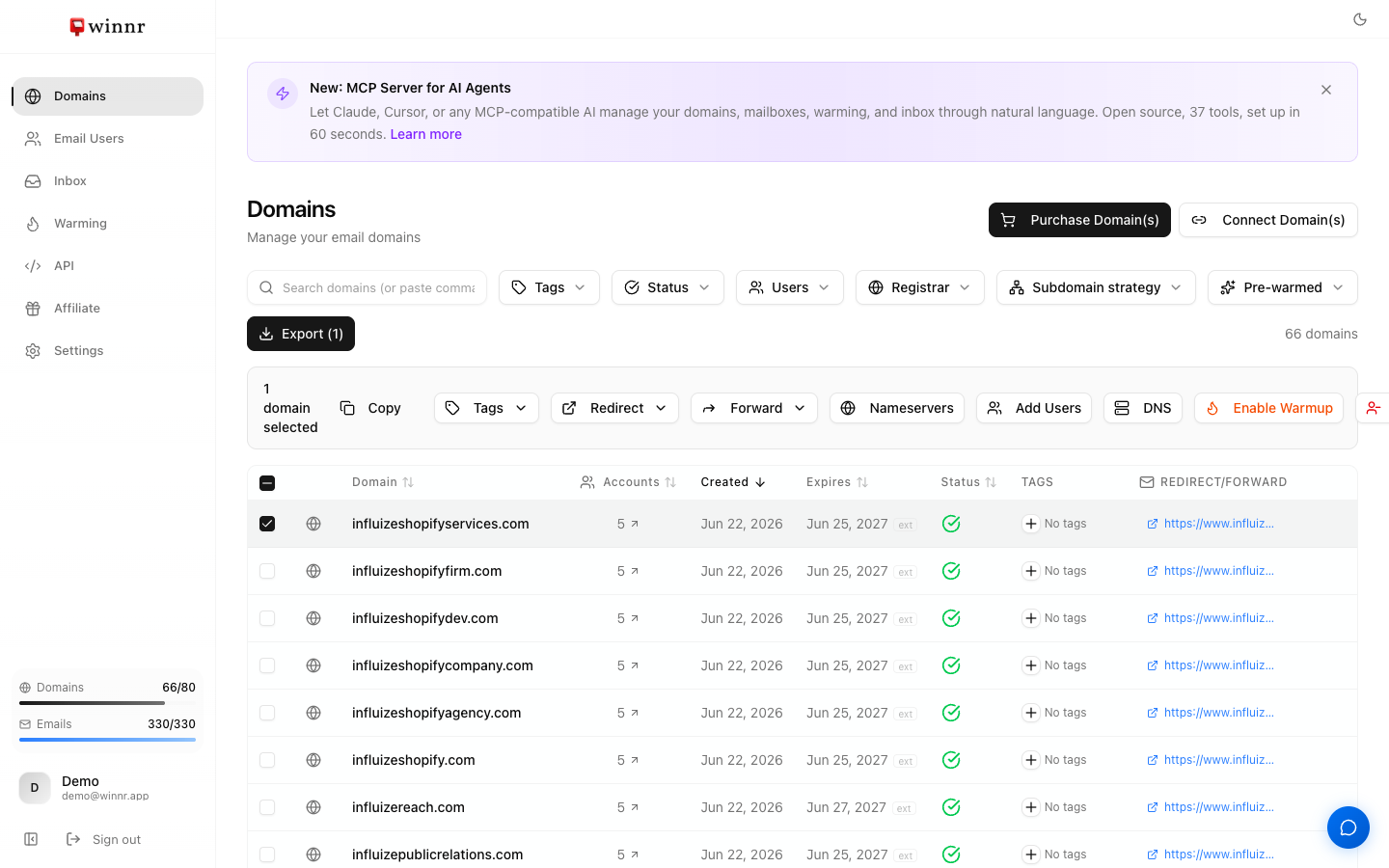
On the Domains page, check the boxes on the rows you want to change. An action bar appears at the top with the count of selected domains. From there you can copy the domain names, add or remove tags, set a redirect or forwarding address, check nameservers, add mailboxes, add or edit custom DNS records and DMARC, enable warming, delete all mailboxes on the selected domains, or delete the domains themselves. For DNS changes you can also ask the Winnr Agent in the app to do it for up to 50 domains at a time.
When bulk is worth it
If you're managing more than a handful of domains, bulk actions save real time. Common uses:
- Onboarding a new client. Buy 15 domains, tag them all with the client's code, then enable warming.
- Adding a tracking domain everywhere. Select the domains, click DNS, and add the same tracking CNAME to all of them.
- Handing DNS to whoever manages it. If you connected domains with manual DNS records, select them, open More, and click Download DNS records for a CSV of every record to publish.
- Retiring a campaign. Filter by tag and delete the whole set.
- Rebranding. Set a new redirect URL across all your domains at once.
Selection with filters
Bulk actions respect the filters on the Domains page (search, Tags, Status, Users, Registrar, Subdomain strategy, Pre-warmed). Example:
- Filter by tag
client-acmeso only those domains show. - Click the header checkbox. It selects every domain that matches the filter.
- Open Tags and add
q3-launch. It's added only to the client-acme domains.
This is how you scope a bulk action to a subset without checking each row by hand.
Using the Winnr Agent for DNS changes
The Winnr Agent chat panel in the app can make the same DNS changes for you in plain language. Ask it to add, change, or delete a TXT, CNAME, A, or AAAA record, or to set or reset a DMARC policy, on up to 50 domains per request. It shows a summary of what it's about to change, and nothing happens until you click Confirm.
What's next
Step-by-step
-
1. Select domains
Check the box at the left of each row, or use the header checkbox to select every domain that matches your current filters. A banner then offers "Select all" to extend the selection to every domain in your account.
-
2. Use the action bar
Once one or more rows are selected, an action bar appears at the top of the table showing how many domains are selected. The X on the left clears the selection.
-
3. Pick the action
The buttons are Copy, Tags, Redirect, Forward, Nameservers, Add Users, DNS, Enable Warmup, Delete Accounts, and Delete. Two more appear only when they apply: Verify DNS (for domains set up with manual DNS records that are still pending) and Re-check NS (for active domains with a nameserver problem). Under More, Download DNS records appears when the selection includes domains connected with manual DNS records.
-
4. Confirm
Destructive actions ask for confirmation. Bulk Delete asks you to type the word DELETE before the button unlocks.
-
5. Let it finish
Changes such as redirects, forwarding, and deletions are queued and finish in the background. You can navigate away while they run.
Frequently asked questions
How many domains can I bulk-edit at once?
You can select every domain in your account. Large deletes are split into batches of 100 automatically, so you don't need to split them yourself. When you ask the Winnr Agent to change DNS, each request covers up to 50 domains; for more than that, use the DNS button in the action bar.
What does each button do?
Copy puts the selected domain names on your clipboard, one per line. Tags adds tags, removes specific tags, or removes all tags. Redirect and Forward set the website redirect and email forwarding address. Nameservers shows the nameservers each domain needs and lets you re-check them. Add Users creates mailboxes on the selected domains. DNS adds custom records, overrides DMARC, or edits existing custom records. Enable Warmup opens the warming dialog. Delete Accounts deletes the mailboxes on the selected domains but keeps the domains. Delete removes the domains and all their mailboxes.
Can I add DNS records to many domains at once?
Yes. Click DNS in the action bar. The dialog has three tabs. Add custom record (TXT, CNAME, A, or AAAA), Override DMARC, and Existing records, where you can edit or delete custom records across all the selected domains. Adding a record that already exists at the same name and type overwrites it. Domains connected with manual DNS records are skipped, because Winnr doesn't host their DNS.
Can I download the DNS records for domains I connected with manual DNS records?
Yes, at any time, not only during setup. Select the domains, open More in the action bar, and click Download DNS records. You get one CSV with the columns Domain, Type, Host, Value, TTL, and Purpose, the same file the connect flow gives you, including the redirect A record for each name. Selecting a parent domain also includes all of its subdomains, so you don't need to tick them one by one. Domains whose records are still being generated are left out and listed in a message.
Can I bulk-change how a domain's DNS is connected?
No. The connect method (nameservers, Cloudflare token, or manual records) is set per domain when you connect it.
Does bulk-enable warming charge me for every mailbox at once?
Warming is $0.60 per mailbox per month. The Enable Warmup dialog shows the monthly cost of what you've selected before you confirm, and you pick the mailboxes inside that dialog.
Can I undo a bulk action?
Tags are reversible, just run the opposite action. Redirect and Forward overwrite the previous values, and each has a Remove button. Delete is permanent, but deleted domains and their mailboxes are backed up, so contact support if you need something restored.