In Winnr go to Email Users → Export, choose ReachInbox, click Export, then Download CSV. In ReachInbox, go to Email Accounts, add new accounts, upload the CSV and map the fields. The file sets max_emails_per_day to 15 with a 300 to 1200 second gap between sends, and leaves bcc, cc and signature empty.
ReachInbox is a cold-outreach platform with sequencing, a unified inbox and its own warm-up. Winnr provisions and warms the mailboxes; ReachInbox runs the campaigns.
What's in the ReachInbox file
| Column | What Winnr puts in it |
|---|---|
| The full email address | |
| first_name | First word of the display name |
| last_name | Rest of the display name |
| imap_host | That mailbox's mail server |
| smtp_host | That mailbox's mail server |
| imap_port | 993 (SSL) |
| smtp_port | 465 (SSL) |
| imap_password | The mailbox password |
| smtp_password | The mailbox password (same as IMAP) |
| imap_username | The full email address |
| smtp_username | The full email address |
| max_emails_per_day | 15, or the mailbox's Winnr daily send limit if lower |
| min_delay_seconds | 300 |
| max_delay_seconds | 1200 |
| bcc | Empty |
| cc | Empty |
| email_signature | Empty |
Check before you upload
- Mapping. The columns alternate IMAP and SMTP (imap_host, smtp_host, imap_port, smtp_port and so on). When ReachInbox asks you to map fields, check each IMAP field lands on IMAP and each SMTP field on SMTP.
- Delays. 300 to 1200 seconds spreads 15 sends over a few hours. Widen the gap if you want sends spread across a full day.
- Signature. email_signature is always empty. Add signatures in ReachInbox, where bulk edit can set one across many accounts.
Daily limit in ReachInbox
ReachInbox reads the daily limit from max_emails_per_day, pre-filled with 15. Keep cold sending at 10 to 20 per mailbox per day and each mailbox's total, cold plus warming, at 50 or under. Warm new mailboxes for at least two weeks before they send cold.
What's next
Step-by-step
-
1. Select the mailboxes in Winnr
Open Email Users and tick the mailboxes you want in ReachInbox. To take one domain, filter by it and tick the header checkbox. With nothing ticked, the export includes every mailbox in your account.
-
2. Export in the ReachInbox format
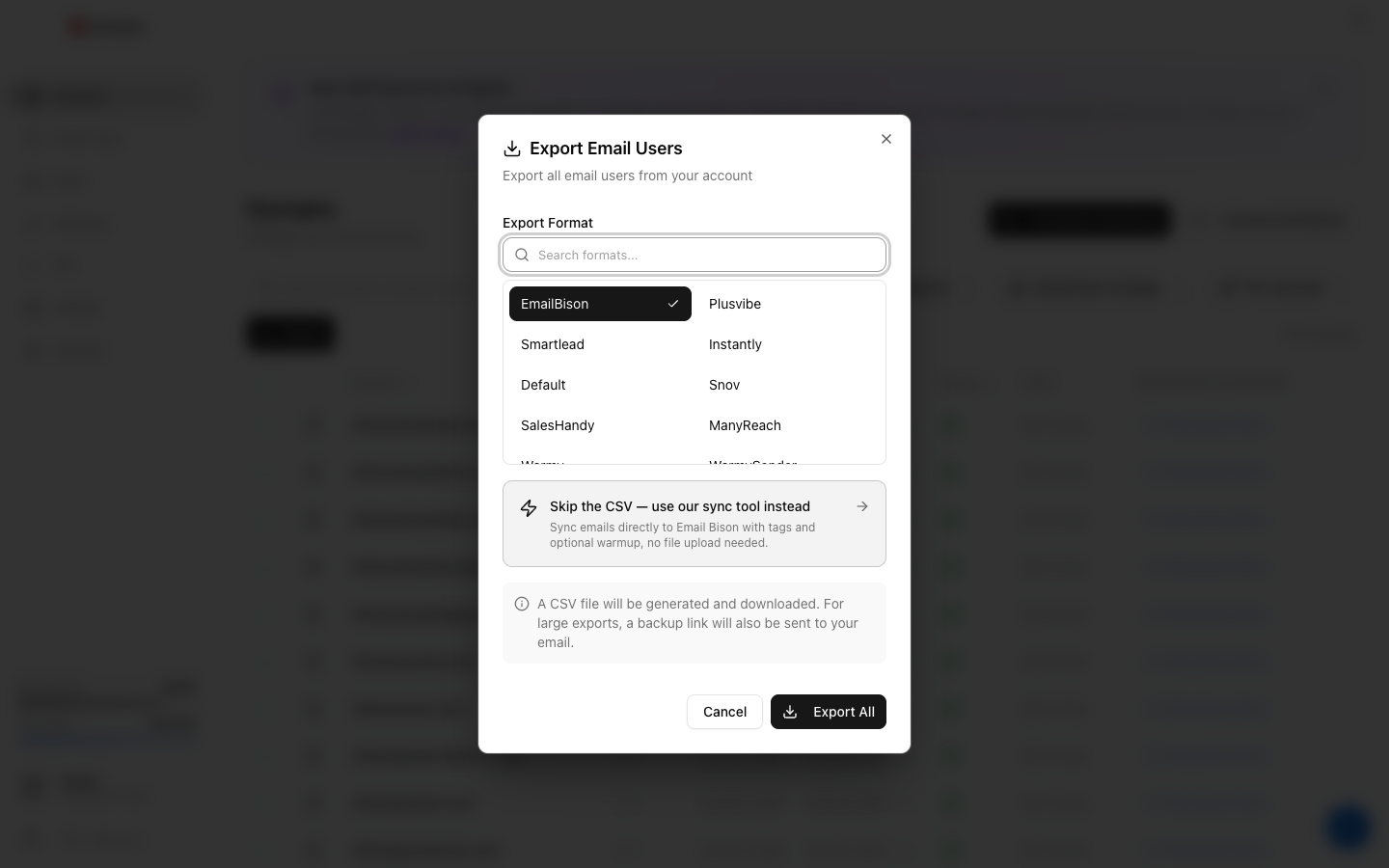
Click Export, choose ReachInbox under Export Format (the search box finds it quickly), then click the Export button.
-
3. Download the CSV
Click Download CSV. The link lasts 15 minutes, so export again if it has expired. The file holds passwords in plain text, so keep it private.
-
4. Upload and map
In ReachInbox, go to Email Accounts, add new accounts, upload the Winnr CSV and map each column to the matching ReachInbox field.
-
5. Adjust settings and confirm
Check every mailbox connected. ReachInbox's bulk edit lets you change sending and warm-up settings across many accounts at once.
Frequently asked questions
What sending pace does the file set?
max_emails_per_day 15, with min_delay_seconds 300 and max_delay_seconds 1200, so sends are 5 to 20 minutes apart. Change the columns before upload, or use ReachInbox's bulk edit afterwards.
Is this the same as the SmartReach format?
The columns are identical, but the ReachInbox file uses a 300-second minimum delay where SmartReach's uses 600. Pick the format named after the tool you are importing into.
Should I use ReachInbox's warmup or Winnr's?
Pick one per mailbox. Winnr's built-in warming is $0.60 per mailbox per month; if you use it, keep ReachInbox's warm-up off so the mailbox is not warmed twice. The file has no warmup column, so check the setting after import.
Does ReachInbox read replies over IMAP?
Yes. It pulls replies into its unified inbox over IMAP, and the file includes imap_username, imap_password, imap_host and imap_port.
Some accounts show an error after the upload. What now?
Check imap_password and smtp_password for those rows. A password changed in Winnr after you exported will not match the file. Export those mailboxes again and re-upload them. If a fresh export still fails, see the mailbox authentication troubleshooting guide.