In Winnr go to Email Users → Export, choose ManyReach, click Export, then Download CSV. In ManyReach, open your mailbox settings and use the bulk import to add the file's mailboxes. The file sets a Daily Sending Limit of 15 with the same Maximum Sending Limit and auto-increase off, an 11-minute minimum delay, and Warmup Enabled FALSE.
ManyReach is a cold-email platform built for high-volume outreach, with a unified inbox. Winnr provisions and warms the mailboxes; ManyReach runs the campaigns.
What's in the ManyReach file
| Column | What Winnr puts in it |
|---|---|
| The full email address | |
| First Name | First word of the display name |
| Last Name | Rest of the display name |
| FromName | The full display name |
| Signature | The mailbox's footer, usually empty |
| ReplyTo | Empty |
| SMTP Username | The full email address |
| SMTP Password | The mailbox password |
| SMTP Host | That mailbox's mail server |
| SMTP Port | 465 (SSL) |
| IMAP Username | The full email address |
| IMAP Password | The mailbox password (same as SMTP) |
| IMAP Host | That mailbox's mail server |
| IMAP Port | 993 (SSL) |
| Daily Sending Limit | 15, or the mailbox's Winnr daily send limit if lower |
| Auto Increase Sends | FALSE |
| Limit Increase Percentage | 15 |
| Maximum Sending Limit | Same as Daily Sending Limit |
| Minimum Delay [min] | 11 |
| Warmup Enabled | FALSE |
| Warmup Limit | 30 |
| Auto Increase Warmups | TRUE |
| Warmup Limit Increase [%] | 15 |
| Maximum Warmup Limit | 30 |
| Reply Rate [%] | 50 |
Check before you upload
- Signature and ReplyTo. Signature is usually empty and ReplyTo is always empty. Fill them in the file, or set them in ManyReach after import, if your campaigns need them.
- Minimum Delay. 11 minutes between sends spreads 15 emails across a working day. Shorten it only if you send in a narrow window.
- Warmup Enabled. Leave FALSE when Winnr warms the mailbox. The warmup columns below it do nothing until it is TRUE.
Daily limit in ManyReach
ManyReach reads three columns together: Daily Sending Limit, Auto Increase Sends and Maximum Sending Limit. The file sets them to 15, FALSE and 15, so each mailbox sends at most 15 campaign emails a day. Keep cold sending at 10 to 20 per mailbox per day and each mailbox's total, cold plus warming, at 50 or under. Warm new mailboxes for at least two weeks before they send cold.
What's next
Step-by-step
-
1. Select the mailboxes in Winnr
Open Email Users and tick the mailboxes you want in ManyReach. To take one domain, filter by it and tick the header checkbox. With nothing ticked, the export includes every mailbox in your account.
-
2. Export in the ManyReach format
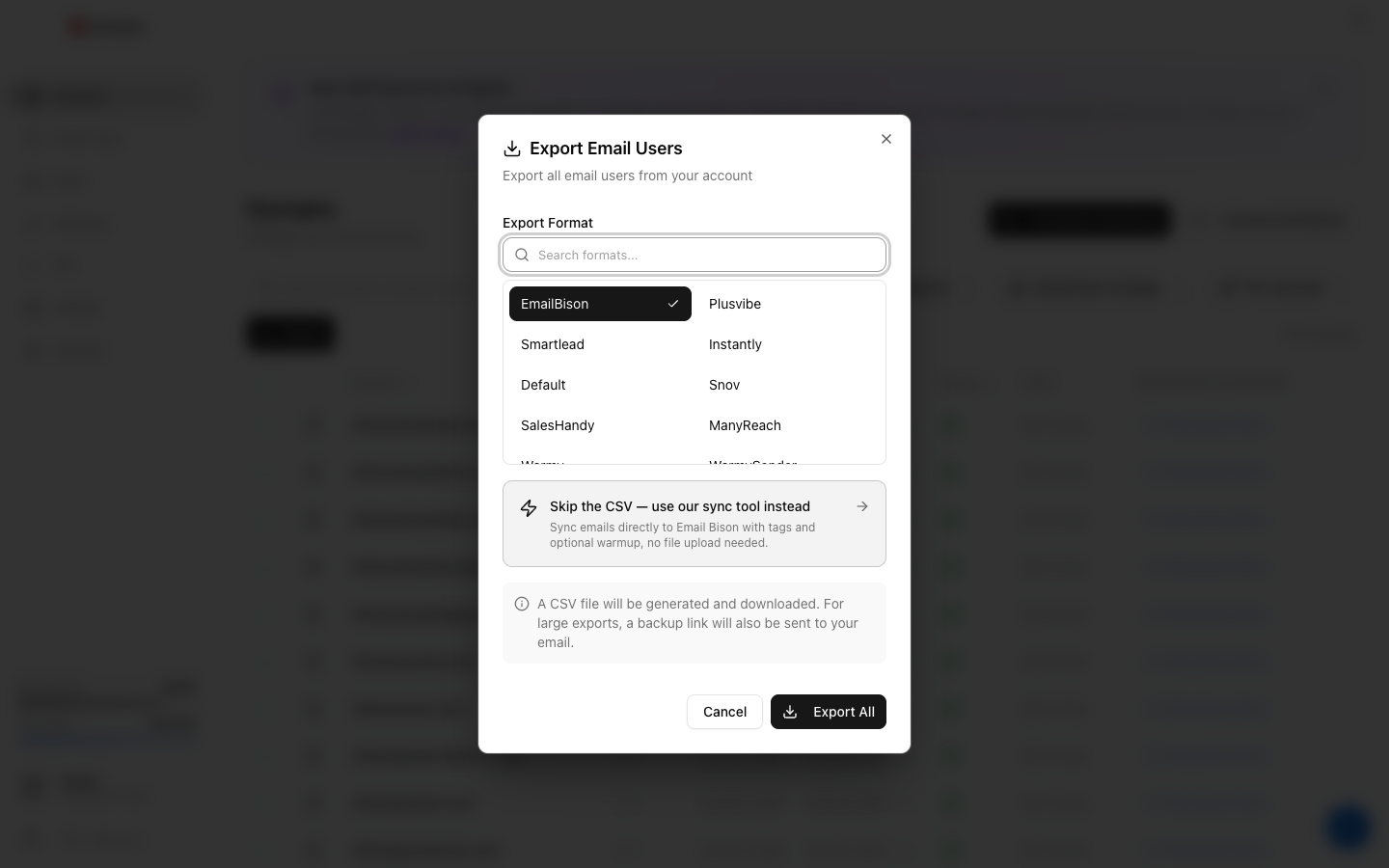
Click Export, choose ManyReach under Export Format (the search box finds it quickly), then click the Export button.
-
3. Download the CSV
Click Download CSV. The link lasts 15 minutes, so export again if it has expired. The file holds passwords in plain text, so keep it private.
-
4. Review the sending and warmup columns
The file sets Daily Sending Limit and Maximum Sending Limit to 15 with Auto Increase Sends FALSE, so the mailbox does not ramp past 15, and leaves ManyReach's warmup off. If ManyReach does the warming instead of Winnr, change Warmup Enabled to TRUE.
-
5. Import into ManyReach
In ManyReach, go to the Mailboxes settings and use the bulk import option to add the mailboxes from the file.
-
6. Confirm every mailbox connected
Check that every mailbox shows as connected in ManyReach before launching a campaign.
Frequently asked questions
Why is Maximum Sending Limit the same as the daily limit?
So ManyReach's auto-increase can never ramp a mailbox past the cold limit, even if you switch Auto Increase Sends on later. Raise both if you deliberately want more.
Why are there warmup values if warmup is off?
They only apply if you set Warmup Enabled to TRUE. Warmup Limit 30 (auto-increasing by 15% up to a maximum of 30) plus 15 cold emails keeps the mailbox under 50 a day in total. Reply Rate is 50%.
Should I use ManyReach's warmup or Winnr's?
Pick one per mailbox. Winnr's built-in warming is $0.60 per mailbox per month; if you use it, leave Warmup Enabled at FALSE. Set it to TRUE only if ManyReach is doing the warming instead.
Does ManyReach read replies over IMAP?
Yes. It pulls replies into its unified inbox over IMAP, and the file includes the IMAP username, password, host and port.
A mailbox fails ManyReach's connection test. What now?
Check SMTP Password and IMAP Password for that row. A password changed in Winnr after you exported will not match the file. Export that mailbox again and re-import it. If a fresh export still fails, see the mailbox authentication troubleshooting guide.