The quickest route is Winnr's sync: Settings → Tools → EmailBison tab → Sync Emails. Connect with your EmailBison API hostname and API key, pick a workspace, and Winnr imports your mailboxes with a 15-a-day limit, skipping any that are already there. To use a file instead, go to Email Users → Export, choose EmailBison, download the CSV and upload it with EmailBison's bulk mailbox import.
EmailBison is a cold-email sequencer with a unified inbox for replies. Winnr provisions and warms the mailboxes; EmailBison runs the campaigns.
What's in the EmailBison CSV
The sync sends the same 10 fields, so this also shows what the sync creates.
| Column | What Winnr puts in it |
|---|---|
| Name | The mailbox's display name |
| The full email address (also the login) | |
| Password | The mailbox password, used for both SMTP and IMAP |
| IMAP Server | That mailbox's mail server |
| IMAP Port | 993 |
| SMTP Server | That mailbox's mail server |
| SMTP Port | 465 |
| Daily Limit | 15, or the mailbox's Winnr daily send limit if lower |
| SMTP Secure | true |
| IMAP Secure | true |
Check before you upload
- One password column. EmailBison's layout has a single Password and no username column: the Email doubles as the login for both SMTP and IMAP.
- Secure flags. Leave SMTP Secure and IMAP Secure as true. Ports 465 and 993 only work over SSL.
- Workspace. The sync imports into the one workspace you pick. Run it again with another workspace selected to load a second one.
- No warmup in the CSV. EmailBison's warmup stays at its own default for CSV imports. Check it after import if Winnr is warming the mailbox.
Sync tags later
The same EmailBison tab also has a Sync Tags tool. It finds your Winnr mailboxes in EmailBison and attaches your Winnr domain tags to them, so you can filter senders by tag in EmailBison. The tags must already exist in your EmailBison workspace.
Daily limit in EmailBison
EmailBison's per-sender daily limit is its campaign limit, so it gets the cold value: 15 per mailbox per day (keep it between 10 and 20). Warming counts on top, so keep each mailbox's total at 50 or under. Warm new mailboxes for at least two weeks before they send cold.
What's next
Step-by-step
-
1. Open the Sync Emails tool
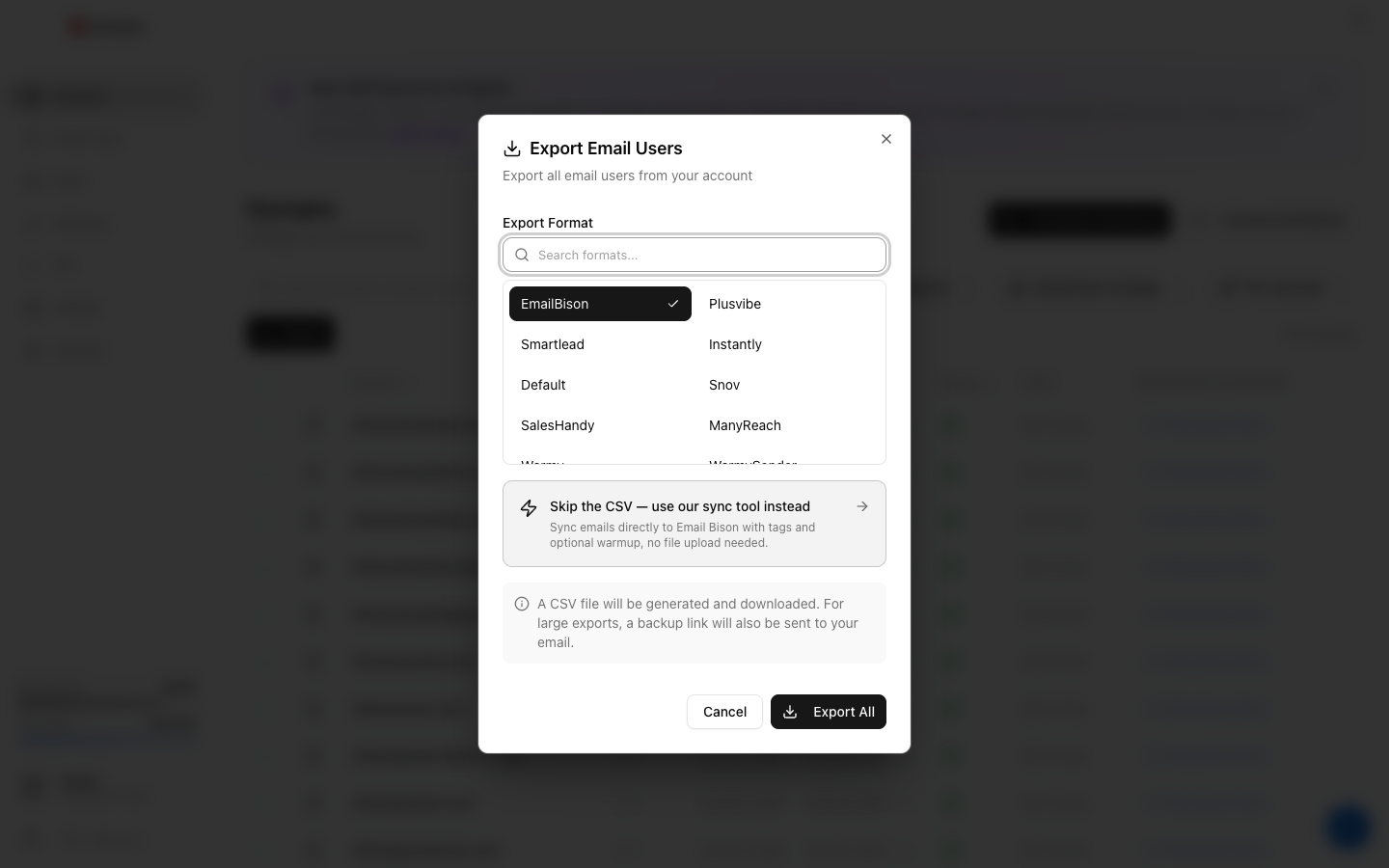
In Winnr go to Settings → Tools, open the EmailBison tab and choose Sync Emails. Choosing EmailBison in the Export dialog also shows a shortcut to this tool.
-
2. Connect to EmailBison
Enter your EmailBison API hostname (without https://) and an API key, connect, then select the workspace the mailboxes should go into.
-
3. Choose scope and options
Optionally narrow the sync to certain domain tags or domains (it defaults to all). Choose whether to copy your Winnr domain tags across and whether to turn on EmailBison's warmup for the imported mailboxes.
-
4. Run the sync
Click the Sync Emails button at the bottom. Mailboxes already in the workspace are skipped, and a summary shows how many were imported, skipped and tagged.
-
5. Or export a CSV instead
On Email Users, tick the mailboxes (or tick none to export all), click Export, choose EmailBison, click Export, then Download CSV. The link lasts 15 minutes. In EmailBison, upload the file with its bulk mailbox (CSV) import.
-
6. Confirm every mailbox connected
Check that every mailbox shows as connected in EmailBison before you add it to a campaign.
Frequently asked questions
Should I use the sync or the CSV?
Use the sync when you can: no file handling, duplicates are skipped, and tags can come across in the same run. The CSV is useful when you want to review or edit the file first, or load mailboxes some other way.
What daily limit do the sync and the CSV set?
The sync sets 15 on every mailbox. The CSV's Daily Limit column is 15, or the mailbox's own Winnr daily send limit if that is lower. Keep cold campaigns at 10 to 20 per mailbox per day and each mailbox's total, cold plus warming, at 50 or under.
Should I turn on EmailBison's warmup in the sync?
Only if you are not using Winnr's warming. Winnr's built-in warming is $0.60 per mailbox per month; pick one per mailbox so it is not warmed twice. The sync's warmup switch is off by default, and the CSV has no warmup column.
Why did the sync skip some mailboxes?
Mailboxes whose address already exists in the selected EmailBison workspace are skipped rather than duplicated, so it is safe to run the sync again after you add mailboxes in Winnr.
Do Winnr mailboxes need OAuth or app passwords?
No. They connect over standard SMTP and IMAP with the address and password, so there is no OAuth flow.
A mailbox imported but shows as disconnected. What now?
Usually the password changed in Winnr after the sync or export. Delete that mailbox in EmailBison and sync or export it again. If a fresh copy still fails, see the mailbox authentication troubleshooting guide.