Open Affiliate in the app sidebar. The Dashboard tab shows Total Earned, Pending Balance, Signed Up (Trial), Converted to Paid, and Conversion Rate. The Referrals tab lists everyone who signed up through your link with their status and plan. The Commissions tab lists each commission with its amount, type, status, and hold date. The Payouts tab shows your current balance and payout history.
What the numbers mean
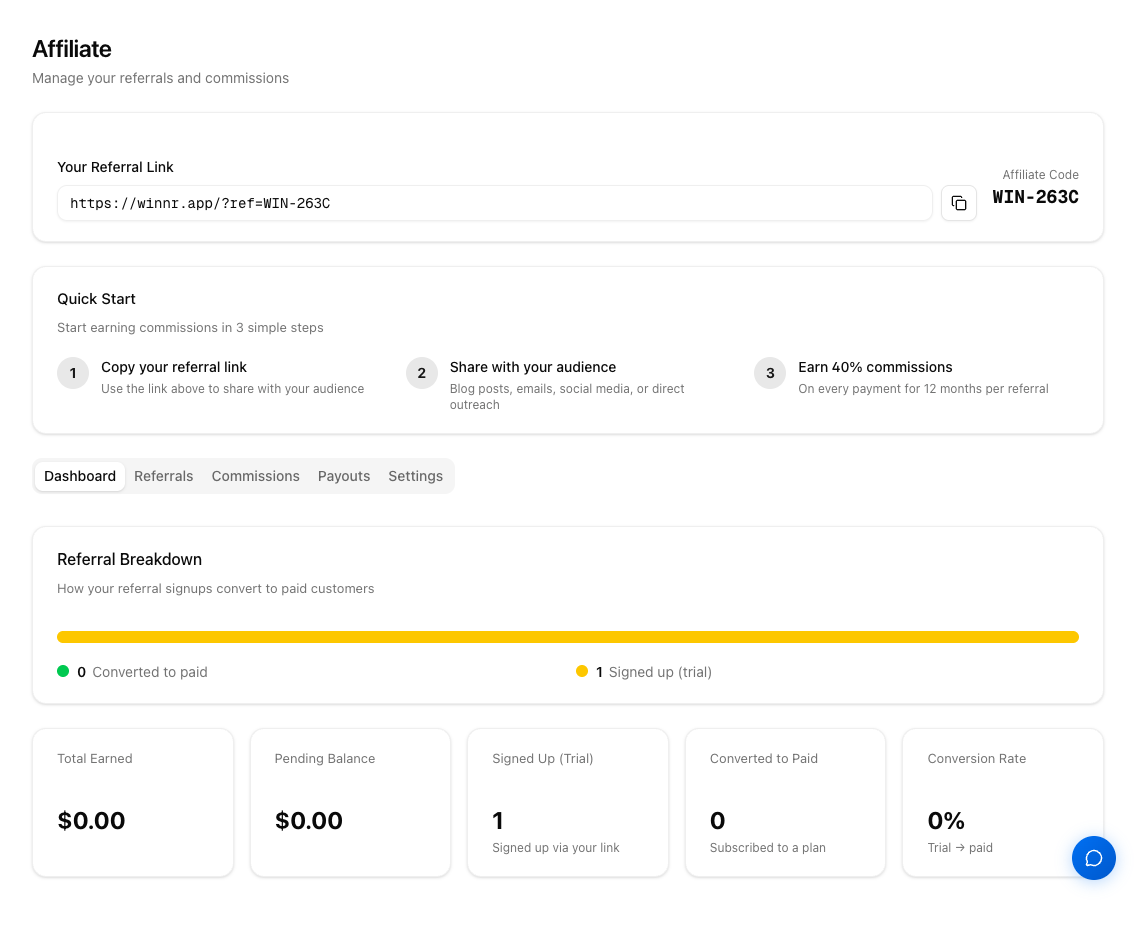
Total Earned: every commission you've earned, including ones still in their hold and ones already paid. Rejected commissions aren't included.
Pending Balance: commissions earned but not yet paid out. It includes commissions still in their 30-day hold, so not all of it may be payable yet. Check the Commissions tab for hold dates. If a commission is rejected during its hold (the customer cancelled, was refunded, or didn't pay), its amount comes back out of Pending Balance and Total Earned.
Signed Up (Trial): everyone who created an account through your link, whether or not they've paid.
Converted to Paid: referrals who went on to pay.
Conversion Rate: Converted to Paid divided by Signed Up.
When you have referrals, a Referral Breakdown at the top of the Dashboard tab shows how many have converted.
The tabs
- Dashboard: the stats above.
- Referrals: who signed up through your link and where they are now.
- Commissions: every commission, with its hold date and status.
- Payouts: your current balance and payout history, plus how to request a payout.
- Settings: change your affiliate code, see your commission structure (rate, type, duration, minimum payout), and payout instructions.
What's next
Frequently asked questions
How fast do new referrals show up?
A signup through your link appears in the Referrals tab as soon as the account is created.
When does a commission appear?
When the referred customer's payment goes through, for their first plan payment, each renewal within 12 months, and pre-warmed charges.
What's in the Referrals tab?
Name, email, status, plan, and signup date for everyone who signed up through your link. Statuses include signed up (no payment yet), subscribed, past due, cancelling, and churned.
What's in the Commissions tab?
Date, amount, type (initial or recurring, and whether it came from a plan or pre-warmed), status (pending, approved, paid, or rejected), and the Hold Until date when the 30-day hold ends.
What's in the Payouts tab?
Your current balance and every payout with its date, amount, method, status, and transaction ID. If any earnings were applied as account credit, the total credited is shown too.
Is there an earnings calculator?
Yes, on the Affiliate page before you join. Pick a number of referrals and a plan mix to see estimated monthly and yearly earnings. It's simple math on your inputs, not a forecast.