The Subdomain Strategy: register one main domain (a .com, .net, .org or .co, or a premium low-abuse .sh, .to, .vc or .io) and Winnr provisions up to 5 subdomains under it, each a full email domain with its own mailboxes, DKIM, SPF, and MX. That is 5 subdomains × 10 mailboxes = 50 inboxes per registered domain instead of 5. A Startup plan's 50 included inboxes takes 1 domain instead of 10; Enterprise's 200 takes 4 instead of 40. Same capacity, different shape: far fewer registrations, with more riding on each one. The classic many-domains route stays fully supported, and neither route is the "right" one for everybody.
Cold email capacity has usually come in one shape: buy a stack of domains, put 5 mailboxes on each, rotate. It works, and most Winnr customers still run it. But the unit that domain blocklists list is the registered domain, and cheap, bulk-registered TLDs are what they see abused most. The Subdomain Strategy is the alternative shape: fewer domains, with the mailbox count made up on subdomains that each behave like a complete email domain.
Why Cold Email Domains Get Blacklisted
When we looked at why some senders' domains ended up on SURBL and similar domain blocklists while others never did, the pattern was not what most people assume (more in our piece on Azure inboxes and SURBL). In our observation, listings track where the domain came from, what TLD it sits on, and how long it has been sending far more than sending IPs, nameservers or warmup tools.
- Domain source and TLD dominate. Bulk-registered domains on cheap TLDs get listed far more often under sustained cold volume than the same senders' domains on established TLDs.
- Age compounds it. Listings accumulate with cumulative sending time. A cheap-TLD domain that survives month 2 usually does not survive month 6.
- Infrastructure matters less than people think. Swapping IPs, registrars or warmup providers does little for domain blocklist listings if source and TLD stay the same.
That points to two levers: register fewer domains (every registration is one more ticket in a lottery you do not want to win) and register them on TLDs that blocklists rarely see abused. The Subdomain Strategy pulls the first lever on any TLD, and both levers with a premium extension.
What the Subdomain Strategy Is
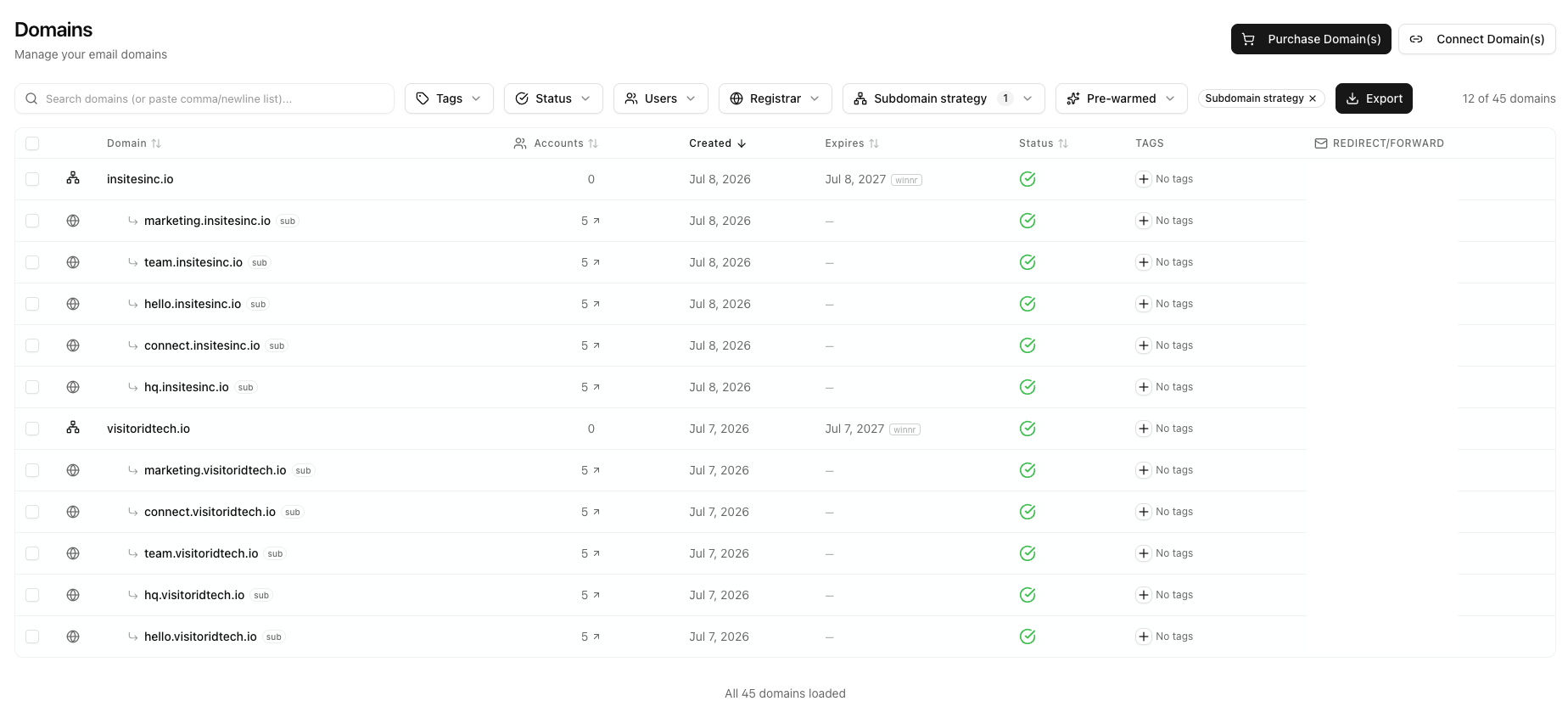
You register one main domain, for example acme.sh (or acme.com). Winnr then provisions up to 5 subdomains under it, each one a full email domain in its own right: its own mailboxes, its own MX records, its own SPF, its own DKIM key, its own DMARC. Up to ten mailboxes per subdomain, five subdomains per domain:
Each subdomain is a complete email domain with its own authentication stack. The parent domain itself never sends and hosts no mailboxes.
Three details matter here:
- Each subdomain is a distinct sending identity.
marketing.acme.shandteam.acme.shhave separate DKIM keys, separate SPF records, separate MX, and separate mailbox sets. To receiving mail servers they are different domains that happen to share a parent. - The parent hosts no mailboxes.
acme.shitself never sends. It exists to carry the registration and the subdomains. - DNS is handled for you. For a domain bought through Winnr, the whole tree is provisioned automatically at purchase. You never touch a DNS console.
The capacity math is what makes it interesting: a classic Winnr domain carries 5 mailboxes, so 50 inboxes normally means 10 registrations. Under the Subdomain Strategy, 50 inboxes means one registration. Per-inbox behavior does not change at all: the same 10 to 20 cold emails per inbox per day, the same warmup, the same sequencer exports.
Choosing the Main Domain's TLD
When you buy through the Subdomain Strategy wizard you can pick a standard .com, .net, .org or .co, or one of four premium extensions: .sh, .to, .vc and .io. The premium four are sold only through this wizard. A standard extension costs less per domain and still gets you 50 inboxes per registration; a premium extension adds the lowest blocklist base rate on top.
Why premium extensions stay clean
The strategy leans on premium TLDs for one reason: abuse economics. Spam operations register domains in bulk, hundreds at a time, and burn them fast. That playbook only works when domains cost a few dollars. Nobody bulk-registers $30 to $50+ domains to burn them in six weeks; the economics collapse. The registries behind these TLDs also keep pricing high and registration policies tighter, which is itself a filter.
In our observation, domains on .sh, .to, .vc and .io are rarely seen on domain blocklists, so they carry little neighborhood suspicion. Compare that with the cheap TLDs that dominate spam-domain registrations, where a brand-new domain starts life already distrusted. (For the broader TLD picture, see our TLD deliverability guide.)
Recipients also read these TLDs as normal. They are technically country-code TLDs, but .io, .sh, .to, and .vc have been mainstream tech and startup domains for years, so a hello.acme.sh sender raises no eyebrows in a B2B inbox.
| TLD | Price (one-time, about) | Notes |
|---|---|---|
| .vc | $28 | Cheapest of the four |
| .io | $30 | Most familiar to recipients |
| .sh | $33 | Short and brandable |
| .to | $53 | Priciest of the four |
| .com (classic route, or a standard main domain) | ~$13 | 5 inboxes per registration on the classic route, 50 as a Subdomain Strategy main domain |
Prices are approximate as of October 2026; the exact price for each name is shown before you pay, and it is paid once when you register. Subdomains are free, so the domain is the entire domain bill for the strategy. The recurring cost is your normal Winnr plan.
The Math: Subdomain Strategy Calculator
The sizing formulas are the same ones behind our cold email calculator, with one new line:
Inboxes required = ⌈ Daily Cold Volume ÷ Cold Emails Per Inbox Per Day ⌉
Main domains (Subdomain Strategy) = ⌈ Inboxes ÷ 50 ⌉ (5 subdomains × 10 mailboxes)
Classic domains = ⌈ Inboxes ÷ 5 ⌉
Anchored to Winnr's plans, at the normal pace of 15 cold emails per inbox per day:
- Startup ($69/mo, 50 inboxes included): 1 main domain × 5 subdomains × 10 mailboxes = 50 inboxes, instead of 10 classic domains. Carries about 750 cold emails/day.
- Enterprise ($189/mo, 200 inboxes included): 4 main domains instead of 40 classic domains. Carries about 3,000 cold emails/day.
Run your own numbers:
Subdomain Strategy Calculator
Set your daily cold volume and pace to see inboxes, domains for each route, and cost. Defaults show the Startup plan worked example: 750/day = 50 inboxes = 1 domain.
Setup Required
Domain Cost (One-Time)
Winnr Plan (Monthly)
Winnr's Startup plan includes 50 inboxes as the entry tier, so smaller targets still show 50. Domain costs are a one-time purchase at registration; the plan is monthly. Both routes are fully supported, and you can mix them in one account; this calculator only changes the domain-shape math, never the plan price.
Honest Caveats
The Subdomain Strategy is a real tradeoff, not a free lunch, and it is worth being precise about what you are trading.
Subdomains share the parent's reputation umbrella
Google and Microsoft track sender reputation largely per registrable domain. Each subdomain carries its own DKIM identity, its own SPF, and its own sending history, and receiving filters do treat subdomains partly independently, but the parent domain is an umbrella over all of them. Domain blocklists list the registrable domain, so a parent-level listing takes all 5 subdomains and all 50 inboxes down at once. On the classic route, the same incident costs you one domain and 5 inboxes.
That concentration is exactly why Winnr caps the strategy at 5 subdomains with 10 mailboxes each, and why per-inbox volume stays at the standard 10 to 20 cold emails per day. Each subdomain runs at a modest pace, and the ceiling keeps the whole registered domain's footprint from ever looking like the 50-to-100-mailbox monodomain setups that get hunted. If your instinct is to push one domain harder than that, this strategy is not the place to do it.
It is an alternative, not a replacement
The classic route and the Subdomain Strategy deliver the same capacity in different shapes, and both are fully supported on Winnr, in the same account, even side by side.
- Choose classic when you want maximum isolation: many small blast radii, each incident capped at 5 inboxes, with domains cheap enough to treat as replaceable.
- Choose the Subdomain Strategy when you want fewer registrations to buy, configure, and monitor (and, with a premium extension, a lower base rate of blacklisting from the TLD itself), and you accept the larger per-domain blast radius.
Neither is the "correct" answer. Same capacity, different shape.
Smaller details worth knowing
- Warmup is unchanged. Subdomain mailboxes warm like any other mailbox; nothing is inherited from the parent. Plan the usual ramp before full cold volume.
- Prefer a dedicated domain over your primary brand domain. A parent that exists for outreach only keeps your main web presence fully separated from outbound sending. If you do want to send under a domain you already own, Winnr's subdomain-format connect never touches the apex's DNS (your website and existing mail keep working untouched). The reputational link between the domain and outbound sending still exists, so weigh that tradeoff deliberately. Our username footprint guide covers the related clustering signals.
How Winnr Automates It
The whole setup happens inside the normal purchase wizard. There is no DNS work, no zone files, and no per-subdomain configuration to do by hand:
Already have the domain? Two more ways in
Buying a fresh domain is only one of three entry points. The same structure works with domains you already have:
- Convert a domain you already have on Winnr. The converter under Settings → Tools → Subdomain Strategy turns a domain you bought through Winnr, or one you connected by pointing its nameservers at Winnr, into a Subdomain Strategy parent. It is free, works on any TLD, registers nothing new and leaves your existing mailboxes untouched. An aged domain with sending history is an ideal candidate, and the same tool is how you add more subdomains to a strategy domain later.
- Connect a domain you host elsewhere. The Connect Domain flow has a "Connect in subdomain format" option: Winnr provisions the subdomains as full sending domains while your apex DNS stays completely untouched (no MX, no SPF, nothing added at the root). Setup is via per-subdomain manual records (with a CSV you can hand to whoever runs your DNS) or a Cloudflare API token.
Cost Comparison: Subdomain Strategy vs Classic
Your Winnr plan price is identical on either route; inboxes cost what inboxes cost. The domain bill is where the shapes diverge. Here is the full picture at the two plan-included sizes, using the normal pace of 15 cold emails per inbox per day:
| Route | Startup: 50 inboxes (≈750 cold/day) |
Domain cost, one-time | Enterprise: 200 inboxes (≈3,000 cold/day) |
Domain cost, one-time |
|---|---|---|---|---|
| Classic .com (~$13) | 10 domains | $130 | 40 domains | $520 |
| .com as a Subdomain Strategy main domain (~$13) | 1 domain | $13 | 4 domains | $52 |
| .vc (~$28) | 1 domain | $28 | 4 domains | $112 |
| .io (~$30) | 1 domain | $30 | 4 domains | $120 |
| .sh (~$33) | 1 domain | $33 | 4 domains | $132 |
| .to (~$53) | 1 domain | $53 | 4 domains | $212 |
The counterintuitive part: even though each premium domain costs 2 to 4 times a .com, the route as a whole is cheaper on domains, because you need 10 times fewer of them. At Startup size, every premium TLD beats the classic route's $130 domain bill, and a .com main domain does it for about $13.
Money is the smaller half of the comparison, though. Ten or forty registrations are ten or forty DNS zones and blocklist entries to monitor. One or four is a portfolio you can actually keep in your head, and with a premium extension each of those registrations sits on a TLD that blocklists rarely see abused.
Frequently Asked Questions
Is 50 inboxes on one domain risky for cold email?
It concentrates more capacity on one registered domain, and you should treat that as a real tradeoff: a parent-level blacklisting affects all 5 subdomains at once. The strategy manages the risk three ways: the mailboxes are split across 5 subdomains that each carry their own DKIM, SPF, and MX, per-inbox volume stays at the normal 10 to 20 cold emails per day, and you can put the domain on a premium low-abuse TLD. It is a different risk shape than the classic route, not a strictly safer or riskier one. And it is nothing like the 50-to-100-mailbox single-hostname setups that got hunted by SURBL: those pile every mailbox onto one sending identity on an abused TLD.
Can I pick my own subdomain names?
Yes. The wizard pre-fills suggestions (marketing, hq, hello, team, connect) and all of them are editable, so you can use whatever fits your brand voice. Labels that read as cold-email signals are blocked, and a small set of infrastructure labels, such as mail, www, and smtp, is reserved because Winnr uses those for the domain's own records.
What happens if the parent domain gets blacklisted?
Domain blocklists list registrable domains, so a listing on the parent takes all 5 subdomains and their 50 inboxes out of rotation together. That is the concentration you accept in exchange for 10 times fewer registrations. Two mitigations matter: it is less likely in the first place (modest per-subdomain volume, and a low-abuse TLD if you choose a premium extension), and recovery is one replacement domain rather than re-buying a stack. If you cannot tolerate a 50-inbox blast radius under any circumstances, run the classic route, or split your fleet across both.
Do subdomains need separate warmup?
Yes. Every mailbox warms normally, exactly as it would on a standalone domain. Subdomains do not inherit warmed reputation from the parent or from sibling subdomains. Winnr's optional warming ($0.60/inbox/month) covers subdomain mailboxes the same as any other mailbox.
Which TLD should I pick for the Subdomain Strategy?
A .com, .net, .org or .co works and costs least. The premium extensions add the lowest blocklist base rate: as of October 2026, .vc is about $28, .io about $30 (the most familiar to recipients), .sh about $33 and .to about $53, each a one-time cost shown at checkout. Among the premium four the deliverability difference is small, so choose on budget and how the name reads in a signature.
Is the Subdomain Strategy better than buying many separate domains?
Neither route is better across the board, and Winnr fully supports both. They produce the same inbox capacity in different shapes. Classic maximizes isolation (each incident touches at most 5 inboxes) at the cost of many registrations. The Subdomain Strategy minimizes registrations (and, with a premium extension, TLD-driven exposure) at the cost of more concentration per domain. Plenty of accounts run both at once.
Why cap it at 5 subdomains with 10 mailboxes each?
Because the parent domain is a shared reputation umbrella, the cap keeps each subdomain at a modest volume (at most 10 inboxes, 100 to 150 cold sends/day at the normal pace) and keeps the registered domain's total footprint deliberately bounded. It is a designed ceiling, not a technical limitation, and it is the reason 50-on-one-domain here does not resemble the crammed monodomain setups that fail. Run fewer per subdomain if you want a smaller footprint.
Do the subdomains cost extra?
No. You pay for the domain registration and your regular Winnr plan; the 5 subdomains are free. Each is provisioned as a full email domain (own MX, SPF, DKIM, DMARC), and its mailboxes draw from your plan's included inbox count like any others.
Putting It All Together
Blacklistings follow registered domains, and they concentrate on cheap, bulk-registered TLDs. The Subdomain Strategy responds to both facts: register up to 10 times fewer domains, and, if you choose a premium extension, register them where abuse is rare. One main domain carries 5 free subdomains, each a fully authenticated email domain with up to 10 mailboxes, for 50 inboxes per registration. One domain covers a Startup plan; four cover Enterprise. The classic many-domains route remains every bit as supported, and the honest answer to "which one?" is the shape question: many small blast radii, or few well-placed registrations. Run the calculator above, pick the shape that fits how you think about risk, and Winnr automates the rest either way.
Related guides: Read the SURBL research that motivated this strategy in why Azure inboxes are getting blacklisted, see the broader picture of which TLDs are safe for cold email, size a classic portfolio with the domain strategy calculator, start from sending volume with the cold email calculator, or buy either shape from cold email domains on Winnr.